Helping design and engineering professionals discover, evaluate and specify technologies and processes that shorten the design cycle and enable success.


Alert!
Digital Engineering ceased publication on July 1, 2026. This website remains available as an archive of engineering content.
For inquiries or information, please email [email protected].

May 2026 Special Focus: Artificial Intelligence in Design and Simulation
In this Special Focus Issue, learn about the latest developments in the integration of artificial intelligence into engineering workflows.

April 2026 Special Focus Issue: Generative Design
In this Special Focus Issue, Digital Engineering takes a look at how generative design solutions can be used across different types of design problems and with a variety of manufacturing approaches to accelerate design space exploration, and…
In 1994, Graebert developed FelixCAD, which was later rebranded as PowerCAD. In 2005, the company replaced its existing CAD engine with an entirely new kernel and ARES was born. Although Graebert is second only to Autodesk in the number of seats of 2D software in professional use, most of its revenue comes from other vendors.
The company’s technology powers Dassault Systèmes’ DraftSight and is found in software from geographic information system goliath Esri. ARES Commander is also sold as CorelCAD, and Graebert’s CAD technology is embedded in Onshape’s cloud CAD platform. ARES Commander is positioned as a more affordable alternative to AutoCAD and uses DWG as the native file format. ARES Commander can now open drawings saved in AutoCAD’s 2018 DWG format, although as a default, files are still saved to the older 2013 DWG format (or any earlier format back to R12).
ARES Commander will feel familiar to AutoCAD users. When starting the latest version, users see an interface nearly identical to AutoCAD, with a Quick Access Toolbar and ribbons across the top of the screen. Each open drawing appears in its own window, identified by a file tab across the top of the drawing area. The drawing file tabs let users switch between drawings or start a new drawing, and use tabs in the lower-left corner of the drawing window to switch between model space and multiple sheets—equivalent to paper space layouts in AutoCAD.
There is also a command window and status bar across the bottom of the screen and users start commands by typing, just like AutoCAD. Some commands have different names—such as PATTERN instead of ARRAY—but thanks to command shortcuts (like aliases in AutoCAD), it’s possible to type the AutoCAD command to start almost any ARES command. There is even a ribbon tab called XtraTools, which contains commands similar to those found on the AutoCAD Express Tools ribbon.
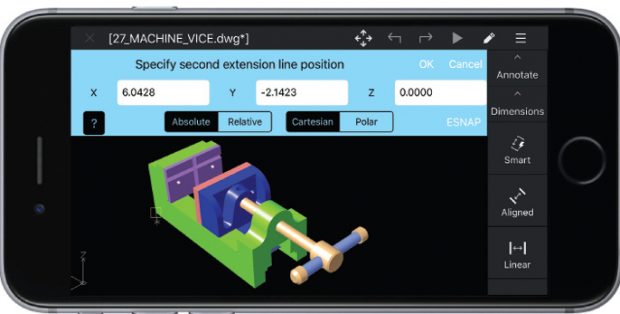
 ARES Touch provides more than 150 tools for viewing and editing DWG files on mobile devices, although many functions require multiple taps.
Tables in ARES Commander have also been enhanced. Users can add formulas to cells using arithmetic operators and export tables in CSV (comma-separated format) files, which can then be imported into spreadsheets and databases. Again, this matches capabilities that have long been available in AutoCAD, but AutoCAD can additionally save table data directly to an XLS or MDB file, and link Excel spreadsheets to tables within drawings.
Other notable new features include a helix tool that lets users create both 2D spirals and 3D helixes, new tools for modifying 3D objects, and a dynamic custom coordinate system feature (like AutoCAD’s dynamic UCS) that temporarily aligns the XY-plane with the face of a 3D solid to allow the ability to draw on that face as if working in 2D.
It’s now possible to copy entities to the clipboard and paste them to the active layer instead of to the source layer. Users can switch between the default dark and light interface themes, although it is necessary to close and then restart ARES Commander before this change takes effect.
AutoCAD compatibility extends throughout ARES Commander. The program can run most AutoLISP and ARX applications and uses the same hatch patterns, linetypes and text files as AutoCAD. Therefore, users should have few compatibility issues when exchanging drawing files, although when opening a DWG file saved using ARES Commander, AutoCAD will warn that the file was not saved by an Autodesk program.
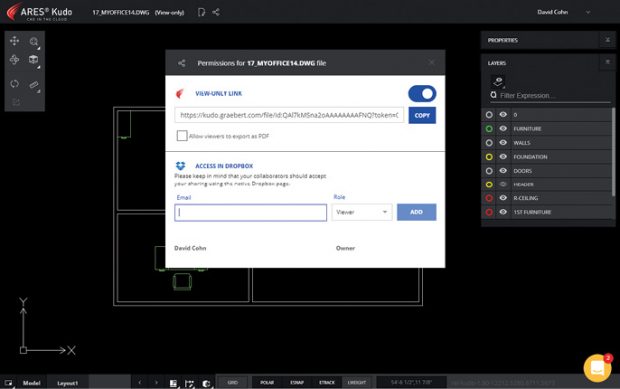
 ARES Kudo connects cloud storage solutions to ARES Commander. Users can view and modify DWG files via the web, and share them with others.
ARES Commander offers some capabilities not available in AutoCAD. For example, there’s a function to insert audio recordings into a drawing and then play them back later. Although AutoCAD does not support these VoiceNotes, it has no problem opening drawings containing them.
ARES Touch is the mobile app for Android and iOS that lets users read, annotate and modify DWG files on the go. The program has three different modes. Full mode (which requires a subscription), enables use of more than 150 ARES commands to read, modify and annotate drawings. Simple mode lets users view and add annotations; and View mode devotes nearly the entire screen of the mobile device for viewing drawings, but provides few tools.
We downloaded ARES Touch from the Apple App Store and loaded it on an iPhone 7 Plus. The software was quite easy to use, but most operations require multiple picks. For example, to add a smart linear dimension, users must first tap Annotate, then tap Dimension and then tap Smart. A small dialog opens to prompt to specify the entity. Once a user taps in the drawing to select the entity they want to dimension, the program prompts to specify the dimension line position. Once this is done, the program prompts again to clarify an entity. Tap OK without selecting anything else to complete the dimension.
With ARES Touch, users can record a voice note or take a photo in the field on their phone, attach it to a drawing and save the DWG file to the cloud. Stakeholders quickly receive notification of the change and can open the file using any of the trinity of ARES products—Kudo, Touch or Commander.
Although drawings are first downloaded to the mobile device, when saving changes, they are uploaded back to the cloud. Thanks to ARES Kudo, files are made available to all devices. Running in a web browser, it connects to all cloud storage solutions—including iCloud, Dropbox, OneDrive, Box and Google Drive—acting as a hub for all DWG files. Kudo enables DWG files to follow users on any device, anywhere, without having to install any software. ARES Kudo is also fully integrated with ARES Commander and ARES Touch, so any modification made on one device is instantly synchronized on all devices.
In ARES Commander, Kudo is integrated into a Cloud Storage tab within a palette that is initially docked on the right side of the screen. Once we added our cloud accounts, we could access any DWG file stored in our Dropbox account. ARES Kudo can also generate a view-only link to share with contacts, so that they can see the file online using the free Kudo viewer. There’s also an option for collaborators to export the drawing as a PDF and enable access to the actual DWG file.
Although still lacking some AutoCAD features, ARES Commander is a very complete CAD program that costs thousands of dollars less than AutoCAD. Graebert’s three programs—ARES Commander, ARES Touch and ARES Kudo—work well together, making this trinity of CAD a very attractive alternative.


David Cohn is a consultant and technical writer based in Bellingham, WA, and has been benchmarking PCs since 1984. He is a Contributing Editor to Digital Engineering, the former senior content manager at 4D Technologies, and the author of more than a dozen books. Email at [email protected] or visit his website at www.dscohn.com.
Follow DE
Join over 90,000 engineering professionals who get fresh engineering news as soon as it is published.






About Us · Contact Us · Editorial Team · Advertising · Privacy Policy · Subscriber Services · © 2026 Digital Engineering 24/7 · Peerless Media
 ARES Commander looks like AutoCAD, although it still lacks some AutoCAD capabilities.