Helping design and engineering professionals discover, evaluate and specify technologies and processes that shorten the design cycle and enable success.


Alert!
Digital Engineering ceased publication on July 1, 2026. This website remains available as an archive of engineering content.
For inquiries or information, please email [email protected].

Cut Retrieval-Augmented Generation (RAG) Hallucinations by 50%
Most teams hit the same wall with enterprise AI: LLMs that hallucinate, pipelines that don’t scale, and infrastructure that’s harder to design than the models themselves.

What Is Intelligent BOM Management? A Guide to Smarter Product Development
Learn how intelligent Bill of Materials (BOM) management helps teams collaborate, reduce errors, and bring innovative products to market faster with cloud-based PLM tools.
Beyond time and cost savings, the road forks, with each manufacturer offering a slightly different version of the “must-have” printer. Before getting into printer specifics, experts suggest companies consider some pertinent questions prior to making the big spend on a large-format printer.
When considering a move from outside printing services to an in-house large-format printer, Matt Kochanowski, product manager of Epson, suggests asking, “How long will it take to get prints done and get them back? Everybody’s time is valuable in the digital age.”
Also assess quality control (in-house vs. outsourced), Kochanowski says. “The last thing you want is to get back to the office and figure out something’s wrong.”
If companies are still riding the fence, what else should be considered?
“Key factors include: outsourced document costs; device cost (new or used); supplies; waiting for service providers as prints, copies and scans take a while to produce; and labor costs,” says Bob Honn, senior director, Canon Solutions America.
Canon Solutions America produced a guide on the topic that cites current market costs of various document types. “In fact, recent customer data shows it is not unusual to save 46% or more on your outsourced large-format printing costs when printing in-house,” the guide states. “However, this argument oversimplifies the decision-making process, because there is more to the cost of printing large-format technical documents than just the cost of the print itself.”
Beyond cost, there are operational considerations. Bryan Martindale, HP DesignJet category manager, Americas, offers up a few more questions to ask:
“The decision [to invest in a large-format printer] isn’t so much predicated on the size of a team, but more so on the volume of printing that is done,” Canon’s Honn says. “Generally speaking, as printing volumes increase, so does the justification for an in-house printer.”
Epson’s Kochanowski diverges slightly from Canon’s print volume position. “Any sort of printing you’re doing can warrant large format. You can save so much time vs. sending it out—even for one to two prints a day,” he says.
Size of team can influence the purchasing decision however, Kochanowski acknowledges. Whether a company has one or two users sharing a printer, or printers designed for an entire 100-person-plus enterprise team sending into one server (or any size in-between), it really “boils down to what’s in the budget,” he says.
Connectivity and collaboration needs can vary, but generally, setting up the system is easy. To print in-house, all that’s required is to connect the device to a company’s network, says Honn.
“To collaborate, documents need to be shared to the cloud, but from there can be accessed using Canon Solutions America’s mobile print application, and from there submitted to a device on the network,” Honn says. “This workflow enables real-time collaboration and ensures the entire project team has access to the latest set of documentation.”
The ability to print from anywhere is becoming a standard offering. “Thanks to HP Mobile Printing, our customers not only can easily print wherever and whenever they need it through their smartphone or tablet in a simple way, but they can also use HP Smart app to be able to access extra printing and scanning features that allow them to collaborate better and smarter,” notes Martindale.
Don’t overlook print speed. Epson printers feature a MicroPiezo head with print speed up to 25 seconds for the 36- and 44-in. printers, according to Kochanowski. MicroPiezo print heads eject droplets of ink via mechanical pressure, not heat. The systems precisely control ink volume contained in each droplet.
For in-house, departmental-type printers, Canon Solutions America offers B/W and color printers—the Océ PlotWave Series and the Océ ColorWave series. Speeds range from 4, 6, 8 and 10 D-sized plots per minute, according to Honn.
At HP, “In terms of speed, HP DesignJet printers offer true print speed similar to that of our competitors,” Martindale says. “But beyond pure print speed, it’s important to look at all factors—from job creation to job submission to printed output.”
There are a couple reasons for this trend. “First, one of the factors in bringing large-format printing in-house is ROI,” Martindale adds. “One way to increase the ROI is to print not just technical documents and drawings, but also output such as marketing collateral [...] Second, the use of color dramatically aids in the communication process itself. Ultimately, color helps catch the reader’s eye.
“To simplify, HP’s DesignJet printers somewhat follow a Good-Better-Best progression. It’s true that good-quality color can be obtained with as few as four inks (CMYK). For better output, our customers have found that a six-color configuration provides high-impact output for color images, such as maps and posters. For the best output, HP DesignJets offer eight- or even nine-color inks (plus optional Gloss Enhance for the highest-quality photo outputs).”
Epson has what it dubs UltraChrome XD, five-color, all-pigment based inks, including photo black and matte black. Inks can print on engineering bond paper as well as photo paper depending on the use case. A few ink cartridge sizes are available.
“Our inks are all pigment based. With this, you can have durable prints that are water, scratch and scuff resistant with bright vibrant colors,” Kochanowski says.
“The Océ PlotWave Series and the Océ ColorWave series scanners also include Océ Color Image Logic software, which consistently turns imperfect original documents into perfect copies and scans, saving operator time and reducing waste,” Honn says.
“HP offers a range of compact and intelligent multi-function printers integrated with the latest IT trends. This allows our customers to digitize their work, to easily keep track of constant changes and iterate, to effectively communicate with all stakeholders while working remotely and to easily have all the drawings at a glance thanks to HP Mobile Printing,” adds Martindale.
“Also, because of location of the output tray, access to media drawers and venting requirements due to very low ozone output, the operational footprint of the Océ PlotWave and Océ ColorWave series is often much less than other competitive printers in this space,” Honn explains.
At HP, the company touts its small-footprint large-format printers, which include its 24-in. devices, the smallest of which weighs 56 lbs. and is slightly over 3-ft. wide so it can fit on a desktop. There’s also a smaller multi-function printer with integrated scanner, which weighs a little over 100 lbs. and sits at 3.5-ft. wide—“the smallest footprint for a device of its kind,” according to Martindale. Additional devices in the 36- to 44-in. classes are available.
“Other walkup features to consider include: touchscreen user interface, to easily control printer and scanner/copier with your fingertips using the simple screen movements; [and] security, which helps ensure secure environment for printing, scanning and copying,” Canon Solutions America’s Honn says.
“Also, in today’s CAD departments, there can be a large percentage of ‘walk-up’ users that need to print documents from a USB thumb drive or to quickly scan or print a document from the cloud. Océ PlotWave and ColorWave series printers include a convenient USB port and are cloud capable, making walk-up printing and scanning very easy,” he says.
Security is top of mind for HP. “It’s really impossible to overstate the importance of security. And that is not just referring to the device, but also the data on the printer, as well as the document itself,” Martindale says. At HP, “The device is protected from unauthorized access thanks to HP Secure Boot, as well as Whitelisting—so that only authorized applications will run on your large-format printer. The printer’s HDD is encrypted, protecting its data. And the document is protected with authentication solutions like PIN printing and card readers.”


DE's editors contribute news and new product announcements to Digital Engineering. Press releases may be sent to them via [email protected].
Follow DE






About Us · Contact Us · Editorial Team · Advertising · Privacy Policy · Subscriber Services · © 2026 Digital Engineering 24/7 · Peerless Media
 HP DesignJet Z9+ Printer Series Print Service provider. Image courtesy of HP.
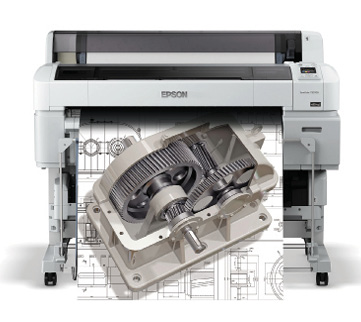 T5270D with technical drawing and gear rendering. Image courtesy of Epson.
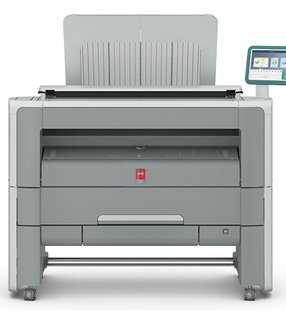 Océ PlotWave 345 large-format printer. Image courtesy of Canon Solutions America.
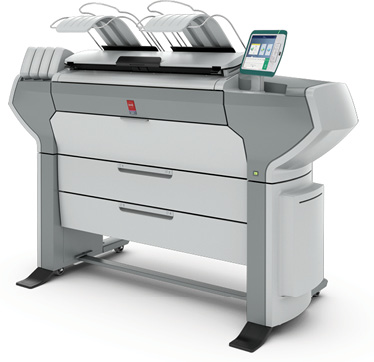 Océ ColorWave 500 large-format printer. Image courtesy of Canon Solutions America.
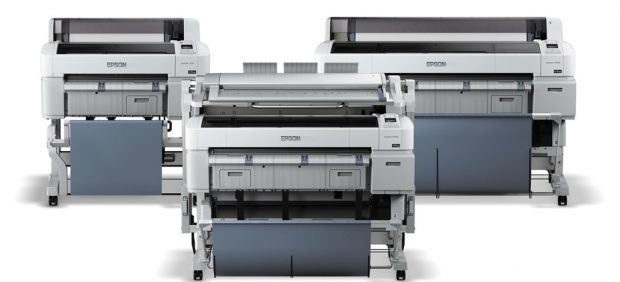 SureColor T-Series family of large-format printers. Image courtesy of Epson.
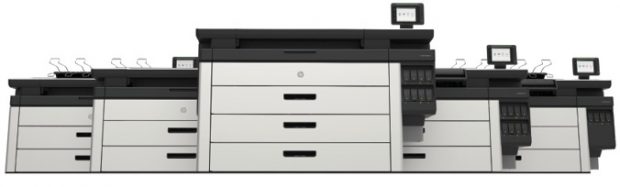 HP’s RENDER PageWide XL family of printers. Image courtesy of HP.