Helping design and engineering professionals discover, evaluate and specify technologies and processes that shorten the design cycle and enable success.



May 2026 Special Focus: Artificial Intelligence in Design and Simulation
In this Special Focus Issue, learn about the latest developments in the integration of artificial intelligence into engineering workflows.

Design & Simulation Software Guide 2025
In this Special Issue, Digital Engineering presents its second annual guide to design and simulation software vendors.
Makerbot, PrintrBot, Fab@Home and more -- where does one begin in the universe of personal 3D printer (P3DP) choices? Given the exponentially growing number of additive manufacturing (AM) systems targeted directly to consumers, you definitely have a few decisions to make.
Established systems and crowd-funded start-ups now number in the dozens, and are getting more exciting by the week. From total-do-it-yourself to assembled-but-needing-attention to almost-completely-out-of-the-box, the variety of choices dictates you do your homework. DE gives you questions to consider and resources to read or view for sorting out the best fit for your interests, skills and budget.
Getting Started
P3DPs are the man-in-the-street response to commercial AM systems (See “Additive Manufacturing 101,” DE, November 2010) whose prices have, until recently, started above $20,000 and often run to $100,000 and more. Emerging from both university-based and individual efforts, the P3DP movement began in 2004 with the open-source RepRap Project at the University of Bath, England.
Invented by engineer and mathematician Adrian Bowyer, RepRap stands for Replicating Rapid-prototyper, a Tinker Toy-looking structure that builds parts layer by layer by extruding melted plastic filament such as acrylonitrile butadiene styrene (ABS) and biodegradable polylactic acid (PLA). (This approach is often compared to Fused Deposition Modeling, or FDM, the approach Stratasys invented in 1989.) In addition to its simplicity, the radical aspect of a Rep Rap system is that its software, documentation and designs are distributed at no cost under the open-source GNU General Public License. Further, a driving philosophy and primary feature is that the system can build 50% of the parts needed to build another identical system -- thus, the term replicating.
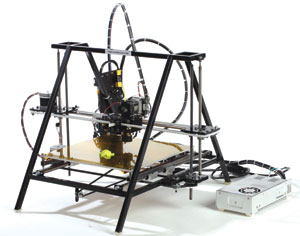 Glacier Steel, a sturdy, steel-frame RepRap printer from The Future is 3D. Image courtesy The Future is 3D. |
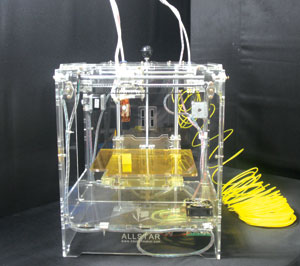 The Cannonball Allstar from iPrint Technologies is a RepRap-based 3D printer, available assembled or in a kit. Image courtesy iPrint Technologies. |
Dozens of companies have since sprung up that sell RepRap part kits and fully assembled models. In addition, in 2006, a new evolutionary branch of the P3DP concept began with the introduction of the Fab@Home system. Developed by Hod Lipson and Evan Malone of the Cornell University Computational Synthesis Laboratory, the Fab@Home project replaces the filament and nozzle of RepRap with a syringe feeder for material placement. This latter design allows the use of any semi-solid material of a consistency that will feed through the syringe -- supporting 3D printing in silicone, cement, frosting, chocolate and more.
This fast-paced subculture has already created multiple printer generations, and inspired dozens of straight-talking blogs, forums and user groups. Some online communities focus on a single brand, while others discuss and compare systems, software, materials and the personal-printing universe in general. To ensure a good fit, minimize frustration and get totally psyched, you could, and should, spend hours learning from these experienced users.
What’s Your Type?
Where do your interests lie?
You’ll find many details to keep in mind as you compare systems, so don’t choose by price alone. Basic differentiators are build envelope (the cubic dimensions of the largest part you can build), part smoothness (mostly affected by layer thickness and build speed, which can vary greatly), and available materials. Most systems are driven by computer (PC vs. Mac), but some read files directly from an SD card. Verify whether all electronics -- and possibly a heated build-platform -- are included.
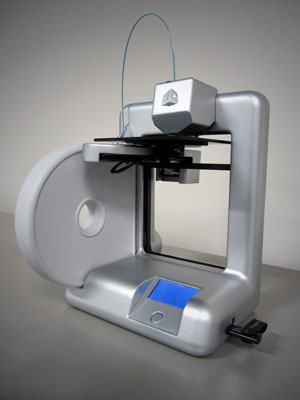 The 3D Systems Cube 3D printer creates parts from a filament of ABS plastic, available in many colors. Image courtesy 3D Systems/Cubify. |
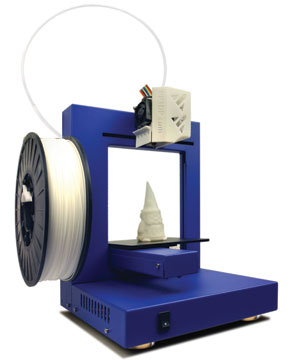 The ABS filament Up! V1.1s printer; the extruder moves in the x-axis only, while the build platform moves in the y and z directions. Image courtesy Delta Micro Factory. |
Think, too, about multiple-color (dual/triple head) printing, delivery cost, lead time and whether you care if your system can use any supplier’s materials (you could be locked into those sold only by the system manufacturer).
Dozens of RepRap Choices
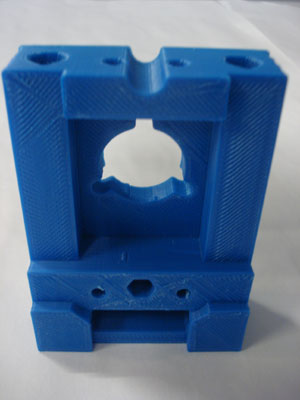 ABS plastic part created on a BotMill (RepRap style) system. Image courtesy BotMill. |
RepRap.org offers instructions for building its Prusa Mendel, MendelMax, Wallace, Original Mendel and RepRapPro Huxley models. A number of companies sell kits and/or assembled units based on these designs; representative models with build volumes and pricing are as follows (see company websites for additional models and specifications):
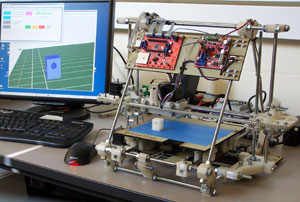 An example of a classic, open-source RepRap Mendel 3D printer. Image courtesy RepRap. |
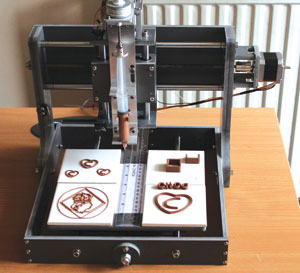 Choc Edge 3D edible chocolate printer (Fab@Home style) system, showing extruder syringe dispensing melted chocolate. Image courtesy Choc Edge. |
The World of Fab@Home
The Fab@Home project includes hundreds of engineers, inventors, artists, students and hobbyists across six continents -- all with broad production goals ranging from food to toys to replacement parts to buildings. Its roots were in the design of a robot that could “evolve” by reprogramming itself and producing its own hardware; the project quickly became much broader. One of its key elements is the openness to use multiple materials, such as edible ingredients or a two-part epoxy.
Compared to RepRap designs, Fab@Home systems are still much more DIY projects, with numerous parts suppliers listed on the project’s website. The original Fab@Home Model 1 has a build volume of 203x203x203mm; Model 2 has the same build volume, but has been redesigned to perform better and be easier to assemble, particularly with respect to the electronics.
More Recent P3DP Activity
There seems to have been an explosion this past year in the P3DP development field. 3D Systems’ new Cubify Cube certainly elevates the legitimacy of this market. The sleek, fully assembled ABS-filament-fed unit features a build volume of 140x140x140mm and was specifically designed for home use. It employs USB and Wi-Fi connectivity and costs $1,299.
Many more systems are in the works, including those launching via the new wave of crowd-funding online communities such as Kickstarter, Indiegogo and Makible. An extremely hot topic is the development of a personal, high-resolution ultraviolet (UV)-cure-resin printer; several are for sale, while some are just at the prototype stage:
Building on the RepRap design:
New in the Fab@Home world is the Choc Creator chocolate extrusion-printing machine from Choc Edge (175x175x70mm, assembled $3,256). In addition, a P3DP based on sintering powders is under development: Check out BluePrinter ApS’ selective heat sintering (SHS) thermal print-head printer for plastics (160x200x140mm, assembled $13,079).
Space constraints limit this discussion to the basics. Depending on your needs, you may want to put in the required web research hours to learn more about the many P3DP and hobbyist offerings online.
However, if you’re looking for more professional 3D printing options that still won’t break the bank for a small- or medium-sized company, see rapidreadytech.com.
Contributing Editor Pamela Waterman, DE’s simulation expert, is an electrical engineer and freelance technical writer based in Arizona. You can send her e-mail to [email protected].
MORE INFO
BitsfromBytes
BluePrinter
BotMill
Buildatron
Choc Edge
Cubify
Delta Micro Factory
Essential Dynamics
Fab@Home
The Future is 3-D
iPrint Technologies
Leapfrog
LemonCurry
Makerbot Industries
MakerGear
Makibox
Maxifab 3D Printing Framework
Mauk Custom Creations
Miicraft
The NextFab Store
PrintrBot
Rapid Ready Tech
RepRap
Robot Factory
Solidoodle
SIMPOD
Thingiverse
Ultimaking
Veloso
Vienna University of Technology


Pamela Waterman worked as Digital Engineering's contributing editor for two decades. Contact her via DE-Editors@ digitaleng.news.
Follow DE
Join over 90,000 engineering professionals who get fresh engineering news as soon as it is published.






About Us · Contact Us · Editorial Team · Advertising · Privacy Policy · Subscriber Services · © 2026 Digital Engineering 24/7 · Peerless Media