Helping design and engineering professionals discover, evaluate and specify technologies and processes that shorten the design cycle and enable success.


Alert!
Digital Engineering ceased publication on July 1, 2026. This website remains available as an archive of engineering content.
For inquiries or information, please email [email protected].


May 2026 Special Focus: Artificial Intelligence in Design and Simulation
In this Special Focus Issue, learn about the latest developments in the integration of artificial intelligence into engineering workflows.

Design & Simulation Software Guide 2025
In this Special Issue, Digital Engineering presents its second annual guide to design and simulation software vendors.
As products become more complex, running detailed simulations can entail large costs in terms of time and compute resources. Engineers and designers can run these simulations on a variety of computing platforms—from workstations to servers, high-performance computing appliances and various flavors of cloud computing. We spoke to cloud and simulation experts about how to determine what mix of resources to use for simulation, and how those options can affect cost.
How important is cost as a driver for cloud utilization? Do users view cloud options as potential cost savers, or are they looking for other benefits?
Rod Mach, President, TotalCAE: Many clients initially adopt cloud solutions with the expectation that they will reduce simulation costs. However, this is often not the case for moderate utilization scenarios.
Instead, the cloud provides greater flexibility and agility, enabling experimentation that on-premises infrastructure is less suited for due to its more fixed and committed nature.
Most clients turn to the cloud for its increased agility in meeting fluctuating demand and handling uncertainty. It’s particularly valuable for those new to high-performance computing (HPC), as it lowers the barriers to entry by reducing the need for extensive approvals to gain HPC experience. The cloud serves as an effective way to test and prove the value of HPC for a company, with the option to integrate hybrid solutions later if needed.
David Katzman, General Manager, Onshape and Arena, PTC: When it comes to technology decisions, costs are always a factor, but when it comes to moving to the cloud, cost is typically not the primary driver in my experience. Cost may be a concern that has to be addressed. What I see more frequently is that there’s an operational opportunity to add efficiency by going to the cloud. That is really one of the biggest drivers. It may be cost neutral, or it may cost more, but the end result is usually when they look at the total cost and factor in those efficiency gains.
David Heiny, Co-Founder and CEO of SimScale: Legacy CAE software typically requires expensive licenses and powerful hardware; costs for commercial CAE packages can run $10,000 to $50,000-plus per workstation for licenses alone. Additionally, maintaining on-premise infrastructure incurs ongoing expenses in server hardware, clusters, energy consumption and IT staff. By contrast, [our] cloud model eliminates high upfront costs and shifts to a pay-as-you-go structure, meaning companies avoid buying and maintaining high-end computing hardware. This flexible pricing (subscription or on-demand) provides predictable costs for budgeting and no long-term commitments. In effect, the cloud approach converts fixed capital costs into variable operational costs aligned with actual usage.
Speed and productivity gains are also a major driver: with no software installation and no queue for limited licenses, engineers can start simulations immediately and run many in parallel, saving time and shortening design cycles.
Krishna Samavedam, Lead Product Manager - Cloud, Ansys: Customers adopt cloud to primarily remove any hardware barrier they might have to accelerate their engineering workflows. If there are hardware barriers, customers tend to simplify their model to fit the hardware they have and/or take a longer time to run the simulations. Companies who can design the best product the fastest will gain the competitive advantage and this is what cloud enables by facilitating and accelerating the product design cycle.
Cost is an important factor when using cloud and the cost for using a specific hardware configuration can look more expensive running on cloud compared to on-premises. However, it is important to compare the total cost of operation when comparing on-premises and cloud use cases. Cloud providers also have cost-saving mechanisms like Savings plans and Reserved Instances among others to reduce their cloud costs.
Another consideration is the growing trend towards operating expenditure (OPEX) over capital expenditure (CAPEX) in IT, since OPEX can provide more flexibility, agility and cost predictability. Cloud services are generally classified as OPEX, whereas long-term investments in large HPC clusters are typically CAPEX. For many companies today, a hybrid approach is the preferred solution.
Juan Alonso, Co-Founder and CTO, Luminary Cloud: In general, engineering firms and customers don’t care where simulations get done as long as they are accurate, automated and fast. The GPU revolution has taken over physical simulation and provided high fidelity. Most companies do not have GPU capacity in their own clusters, and also don’t have enough capacity to go up and down in terms of load.
About five years ago or so, most companies began thinking about cloud for burst capacity for on-premises clusters, but more and more see the benefits of using the cloud. The cost is going down, and you have the availability of GPU compute in the cloud. Most customers don’t care where their simulations are done.
What typically draws customers to cloud-based simulation options? Are there different drivers for “greenfield” customers vs those shifting from on-premise to cloud (or hybrid)?
Mach, TotalCAE: Clients are drawn to cloud-based simulation options primarily for the ability to access a wide variety of HPC hardware with minimal commitment.
The cloud’s flexible, cancel-anytime nature makes it particularly appealing for greenfield customers—those starting fresh without existing infrastructure—as well as for testing new technologies, such as GPU-native CFD solvers. This low-barrier entry allows companies to experiment with advanced hardware without the long-term investment required for on-premises setups.
For customers transitioning from on-premises to cloud or hybrid environments, the drivers differ slightly. Most of our clients adopt a hybrid approach for HPC workloads, retaining and refreshing on-premises infrastructure for day-to-day tasks to benefit from cost savings, faster data transfer speeds and guaranteed capacity.
However, for unexpected workloads, very large models or urgent jobs where queue times are not acceptable, these clients leverage cloud vendors we manage, so they gain the best of both worlds.
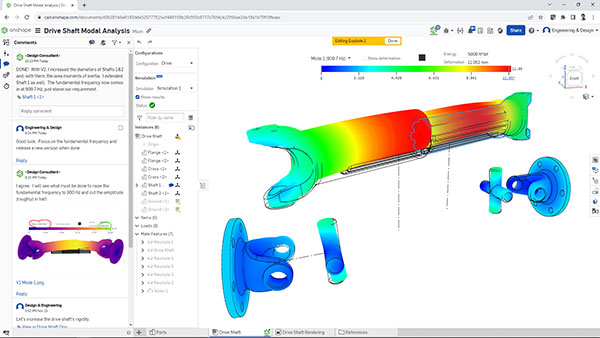
Katzman, PTC: Greenfield is always easier, because newer companies are almost always cloud first. The less installed software, the better. That’s easily a driver for newer adopters because they will always think of cloud first if they can.
The other driver is, you can gain a lot of your time back as an engineer if you can run your simulation—or multiple simulations, for that matter—in the cloud versus tying up your machine. A simple simulation may take a few minutes, but as you know, a complex simulation could take days or hours. When you can ship that workload to the cloud, your engineers can continue to do engineering while simulations are running and get more feedback.
Heiny, SimScale: [Our] mission is to “democratize CAE by making it accessible to everyone,” eliminating the hurdles that kept many engineers from using simulation. In practice, this means no need to invest in HPC hardware or expensive licenses upfront, and minimal training to get started. A new user can simply open a web browser, upload a CAD model and start an analysis in minutes. This appeals especially to small and mid-size companies or startups that cannot afford dedicated HPC clusters or IT teams—they can now perform high-end FEA or CFD on a laptop with internet access. Lower cost and on-demand scalability mean these greenfield users can start small (even with a free community plan) and scale up simulations as their needs grow, instead of making a large fixed investment.
For companies that already have on-premise simulation tools and are shifting to cloud or hybrid models, the drivers tend to be about scalability, efficiency and modernizing workflows and align with broader digital transformation initiatives. These users often face pain points like long queues for shared licenses, limited computing capacity during peak workloads, or burdensome maintenance of aging hardware. For example, an engineering department that only had enough licenses or CPUs to run one simulation at a time can, with cloud access, run dozens of simulations in parallel when deadlines loom. This elasticity is a huge draw for established simulation users because it eliminates bottlenecks at peak times. Another driver for migrating users is the desire to reduce IT overhead and focus on engineering, not infrastructure.
Samavedam, Ansys: The appeal of cloud-based simulation lies in its ability to deploy the necessary hardware with substantial compute capacity on-demand. Ansys solvers have enhanced their support for solving various models and use cases on GPUs, which can be easily accessed in the cloud. Customers with existing on-premise hardware infrastructure often leverage cloud solutions when their current infrastructure cannot fulfill their compute requirements. These customers typically adopt a hybrid approach to manage peak demand, get access to cutting-edge hardware and technology and to accelerate jobs that can scale beyond their on-premise capacity. Conversely, startups, which generally lack extensive on-premises hardware infrastructure, tend to embrace cloud technologies more quickly, and run most of their simulations in the cloud.
How are companies currently leveraging cloud-based simulation? Are there particular vertical industries, workflows or specific physics that are more likely to have shifted to cloud or hybrid models?
Mach, TotalCAE: Companies are increasingly leveraging cloud-based simulation for workloads that demand thousands of cores, generate relatively low data output and utilize CFD license models that support unlimited CPU cores. These characteristics make cloud environments particularly suitable for scaling simulations efficiently. In contrast, workloads requiring fewer than 192 cores or relying on 1-2 GPUs can often be handled by a single, cost-effective on-premises server, reducing the need to migrate such tasks to the cloud.
Certain workflows and physics are more likely to have shifted to cloud or hybrid models. One prominent example is in aerodynamics simulation. This workflow benefits from the cloud’s ability to handle high core counts and provide rapid scalability.
Recently these CFD workloads benefit from using multiple NVIDIA H200 cards that are equivalent to running the same CFD jobs on thousands of cores. Several clients have replaced their cloud usage of thousands of cores, with an eight-way H200 server as it was similar turnaround time, but most cost effective over the long run. These eight-way H200 servers are also available on multiple clouds, though due to the rise of AI, that can be difficult to readily get on-demand.
Katzman, PTC: When you look at basic structural FEA, those are pretty fast and it’s not really that critical to access more compute resources. But when you talk about highly engineered products where every millimeter matters, and you are running CFD or some of the more complex simulations, that’s where the cloud really offers improvements.
Samavedam, Ansys: Companies use cloud computing for simulations with CFD solvers like Fluent and CFX, crash testing with LS-DYNA, and electronics simulations with HFSS and ICEPAK, which all require large computing power and exhibit good scalability as compute resources are increased. In hybrid scenarios, companies tend to run pre- and post-processing with on-premise resources and solve large models in the cloud. Other hybrid scenarios include industries where projects dictate short-term requirements for increased workloads; for example, tape-out in the semiconductor sector or engineering consultants with variable project loads.
Alonso, Luminary Cloud: As a small startup, we started with a specific set of physics, and those have dictated the markets and industry segments our customers come from. We started with compressible and incompressible fluids, heat transfer, releasing multi-phase flows and aeroacoustics. We work in aerospace, automotive, industrial processing, heat exchangers, medical devices, some sporting goods and with some customers in renewable energy.
Are there workflows/scenarios that you would classify as NOT good candidates for a cloud-based simulation solution?
Mach, TotalCAE: The best candidates for cloud-based simulation are workloads that can run self-contained within the cloud environment and be post-processed there, minimizing the need for extensive data movement.
Simulations that require low core counts or require large data transfers between cloud and on-prem are not the best candidates to start with.
Another use case that can be a barrier is that many clients encounter challenges when their data originates on-premises or is created on workstations with models that include files that contain hard-coded paths. This reduces portability and complicates the transition to cloud-based simulation. TotalCAE addresses this issue by providing tools that convert these files into portable versions and orchestrate the data movement to the cloud, unlocking the potential for seamless cloud-based simulation.
For clients with particularly large simulations, enterprises often face significant hurdles due to data transfer limitations, especially when they fail to invest in the necessary cloud technologies to enable high-speed downloads for their CAE teams. While cloud desktops can mitigate the need for downloads by offering remote access to simulation environments, the cost of provisioning and operating a cloud setup with all required resources can significantly increase the overall cost of the simulation environment, making it less cost effective compared to on-premises solutions in some cases [where] at least gigabit transfer speed infrastructure and CAE desktops are already deployed.
Heiny, SimScale: Scenarios where cloud is less optimal would include those with limited or no internet access; highly niche or unsupported physics; strict regulatory/data requirements; heavy users with sunk HPC investments; and where there are long-term fixed licensing agreements.
Samavedam, Ansys: For some companies who have made long-term investments in on-premises HPC, then there may be no financial benefit in adopting cloud simulation. However, on-premises HPC is always subject to a finite lifespan, so this should be kept under constant review.
In some global regions and industries, there may be government legislation, which restricts the use of cloud resources. Cloud services providers are increasingly providing solutions to meet the needs of industries such as aerospace and defense, but there are still some situations where air-gapped on-premises hardware is the most appropriate option.
When it comes to calculating the costs and benefits of cloud vs. on-premise simulation tools, what factors should users take into consideration?
Mach, TotalCAE: When evaluating compute costs, we have some simple Excel calculators where you can plug in the number of jobs you run and type of jobs, and it will output a rough monthly estimate of what you will pay your cloud vendor for on-demand. You can then compare that monthly cost to an on-prem lease of the same type of solution if you just want a cost-only comparison.
However, due to capacity limitations on many popular HPC instances in the cloud, users should consider alternative cloud billing models to ensure guaranteed access when needed if considering a cloud-only option.
Options such as reserved capacity offered by cloud vendors allow users to balance guaranteed capacity in addition to your on-demand usage. While many clients rely solely on the on-demand model, they might be better served by reserving capacity for their workloads, combining billing types to optimize costs and availability. Reserving capacity not only reduces expenses when utilizing the cloud more than 50% of the time on average but also ensures that cloud nodes are available when required, mitigating the risk of unavailability inherent in a pure on-demand approach.
Katzman, PTC: The basics are obviously your hard costs, whether they include subscriptions or usage hours or cost relative to the machine you’re running on, etc. You also have to factor in engineering time savings.
You also need to factor in whether you can run more simulations, which will result in having a better product, faster. If you can identify or quantify those savings, that’s a soft cost that’s often missed. I see that more in industries where they aren’t concerned about time to market, but if they can get more design iterations done faster, they can build a better product and win business more consistently.
Samavedam, Ansys: The hardware barrier is the biggest limiting factor for running simulations on-premises, specifically when there are critical deadlines for completing projects. Going to the cloud is a great solution to remove this barrier and relieve the pressure.
Are there challenges or potential mistakes/misconceptions that companies should be aware of to ensure a successful deployment? Are there areas where customers might misjudge their requirements or the capabilities of the solutions?
Mach, TotalCAE: One common challenge is the underestimation of the effort required to adapt computer-aided engineering (CAE) applications for a high-performance computing (HPC) environment, even for companies with experienced IT infrastructure and cloud teams.
Maintaining 24/7 operation of HPC with CAE applications in the cloud is a highly complex endeavor, demanding significant effort to implement effectively. This complexity arises from the need to deeply understand the applications and how to configure them optimally for cloud infrastructure. This misjudgment of the complexity involved can lead customers to underestimate the time and money they will spend doing it on their own, compared to hiring an expert either externally like TotalCAE, or their own team of HPC Cloud IT CAE specialists.
Katzman, PTC: There are two parts to this. First, customers may misread their requirements. Are they picking the right tools that meet the same quality or standards as some of the legacy on-premises software?
Another concern is being able to shift or change the way you work. One thing we see with our cloud-native products is that people will shift the workloads but not change the way they work, so you’re not actually getting all the benefits [of the cloud]. If you just take a design workflow and shift it to the cloud while leaving everything else the same, then you probably won’t get the real benefit.
The bigger question is, by shifting [those workloads] to the cloud, can you change the way you actually design a product so that the whole process is better for the customer and for you? Can you get better products, or more efficiency or a faster time to market? All of those things matter.
Alonso, Luminary Cloud: When we started in late 2019, security was our main concern. Would engineering firms, which had not used the cloud substantially, be willing to put IP and designs in the cloud? That turned out not to be an issue.
We have a small percentage of customers, maybe 5%, that ask very detailed questions about security practices. If you do this well, and guarantee physical and logical security controls, then people understand that we are serious about those guarantees, and their concerns go away.


TotalCAE's platform revolutionizes high-performance computing for CAE and scientific apps. Our turnkey clusters—fully managed by our IT experts in your data center or cloud (Azure, AWS, GCP)—enable three-click job submissions for hundreds…
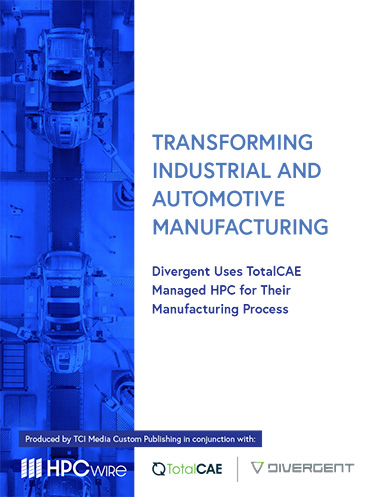
Transforming Industrial and Automotive Manufacturing
Divergent Technologies leverages TotalCAE’s managed HPC clusters and cloud solutions to accelerate 3D-printed automotive and industrial manufacturing, enabling faster simulations, reduced costs, and groundbreaking innovations.

Brian Albright is the editorial director of Digital Engineering.
Contact him at [email protected].






About Us · Contact Us · Editorial Team · Advertising · Privacy Policy · Subscriber Services · © 2026 Digital Engineering 24/7 · Peerless Media