Helping design and engineering professionals discover, evaluate and specify technologies and processes that shorten the design cycle and enable success.



May 2026 Special Focus: Artificial Intelligence in Design and Simulation
In this Special Focus Issue, learn about the latest developments in the integration of artificial intelligence into engineering workflows.

Design & Simulation Software Guide 2025
In this Special Issue, Digital Engineering presents its second annual guide to design and simulation software vendors.
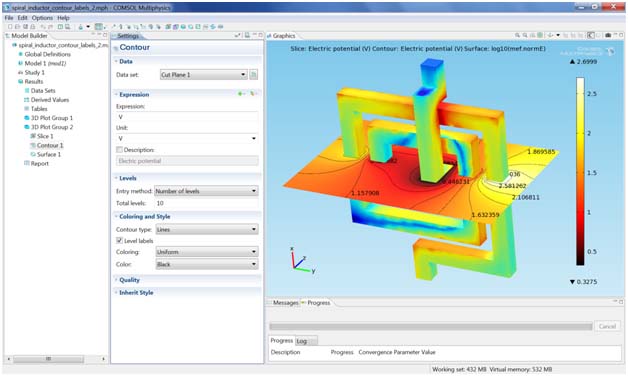
COMSOL’s multiphysics modeling and simulation environment, COMSOL Multiphysics version 4.1, is now available. The new release builds on the usability introduced enhancements in the version 4 architecture and offers dozens of features designed to make the modeling and simulation process more productive.
 |
“Version 4.1 will make users instantly more productive. With the addition of Copy/Paste and duplication features the model tree can be expanded and customized in record time. This really opens the way for users to work efficiently rather than unnecessarily repeating tasks,” says Bjorn Sjodin, vice president of Product Management.
Updates to the interactive, tree-structured Model Builder in version 4.1 make the modeling process more intuitive to manage, according to the company. Of particular note, users can now copy and paste nodes within the Model Builder to avoid repeated sequences of commands. Users can duplicate selected nodes as functions, geometry selections, plot settings and visualization effects, or they can use duplicated nodes to create new images, to study the steps that control solver settings and analysis type, or prepare data for export. Additionally, the Model Builder and Settings window offers new Undo/Redo functionality.
Several new capabilities in version 4.1 boost productivity by delivering accurate simulation results more quickly than before. The new physics-controlled meshing enables users to let the software do the time-consuming mesh-creation process. Currently implemented in the CFD and Plasma physics interfaces, COMSOL now automatically specifies the mesh based on the physics in the model. For example, the fluid flow interfaces use this feature to create a fine mesh throughout the flow region while simultaneously creating boundary layer meshes on no-slip boundaries. The resulting mesh has the added benefit of being optimized for accuracy, delivering precision to fluid flow applications.
COMSOL Multiphysics version 4.1 also introduces simulation job management tools. Version 4.1 also introduces a suite of tools that make simulation results easier to understand more quickly. Time-dependent simulations can now be analyzed using frequency-domain transformation using FFT for computing frequency spectra from. Polar plots have been added to display graphs in polar coordinates specified by radius and angle — a feature is commonly used to present the radiation pattern from antennas. Users will also benefit from predefined operations for computing the maximum, minimum, average, or integral of the values of a quantity in a point over time for a time-dependent model.
Version 4.1 highlights include:
For more information, visit COMSOL.
Sources: Press materials received from the company and additional information gleaned from the company's website.


DE's editors contribute news and new product announcements to Digital Engineering. Press releases may be sent to them via [email protected].
Follow DE
Join over 90,000 engineering professionals who get fresh engineering news as soon as it is published.






About Us · Contact Us · Editorial Team · Advertising · Privacy Policy · Subscriber Services · © 2026 Digital Engineering 24/7 · Peerless Media