Helping design and engineering professionals discover, evaluate and specify technologies and processes that shorten the design cycle and enable success.


Alert!
Digital Engineering ceased publication on July 1, 2026. This website remains available as an archive of engineering content.
For inquiries or information, please email [email protected].

May 2026 Special Focus: Artificial Intelligence in Design and Simulation
In this Special Focus Issue, learn about the latest developments in the integration of artificial intelligence into engineering workflows.

April 2026 Special Focus Issue: Generative Design
In this Special Focus Issue, Digital Engineering takes a look at how generative design solutions can be used across different types of design problems and with a variety of manufacturing approaches to accelerate design space exploration, and…
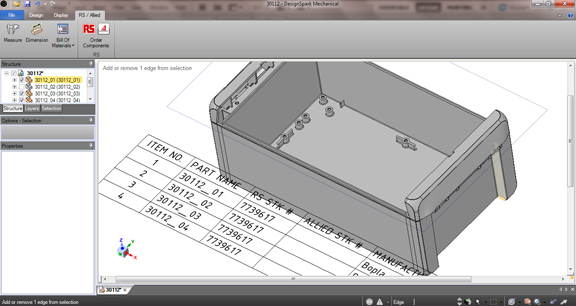
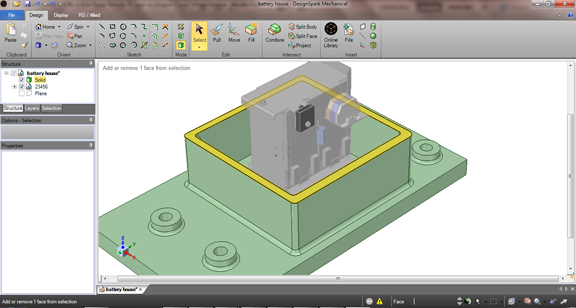
People who have used SpaceClaim will instantly feel at home in DesignSpark Mechanical. After all, the free 3D software (downloadable from the product's home page) is based on the popular direct modeler's code. Standard parts supplier RS Components wants you to think of DesignSpark Mechanical as a gift, but, to be honest, it's a boon for both the giver and the receiver.
The most prominent feature of DesignSpark is its direct access to the catalog of 3D models of standard parts from RS Components and its partners. The feature makes it incredibly easy to download and insert electrical components (batteries, connectors, sockets, and so on) into your mechanical design. RS Components will see returns from its gift when these designs are released to production. The components specified in the bill of materials (BOM) are bound to be purchased sooner or later from RS Components and its partners.
DesignSpark Mechanical supports mostly neutral formats, so you'll need to covert your SolidWorks, Inventor, Solid Edge, or Creo models to STL, IGES, STEP, OBJ, or some other accepted files. Even if it's a few features short of SpaceClaim, DesignSpark's tools and commands are quite robust. They're enough to let you design something from scratch or edit a model.
Its makers expect DesignSpark to facilitate collaboration between mechanical and electrical designer. I can see how the push-pull modeling tools in DesignSpark can make the job easier, especially when you must adjust the walls, base plates, and hinges in your mechanical design to fit an electrical part. The software lets you move faces, edges, and bosses with little or no concern for feature history -- the backbone of traditional feature-based modelers that prevents you from making impulsive edits.
The software lets you automatically generate, edit, and insert a BOM of materials on a chosen drawing plane (or as a floating chart in 3D view, if you'd like). It also includes a shell command that easily turns solids into shelled parts, a particularly handy feature with plastic parts.
The ability to project a cross-sectional view to a sketch plane will come in handy when mechanical designers need to specify PCB layout space for electrical designers. The command that lets you effortlessly create a cross-section at a selected height (for example, in parallel to the top surface of a connector) saves a lot of time.
From consumer goods to hybrid vehicles, electrical components now play an important role in the form and function of products. The MCAD and ECAD disciplines have worked together, but often in different modeling programs. An easy-to-use 3D modeler developed specifically to accommodate electrical components will go along way to bridge the the disjointed workflow.
For more, watch my video below:


Kenneth Wong is Digital Engineering's resident blogger and senior editor. Email him at [email protected] or share your thoughts or suggestions at digitaleng.news/facebook.
Follow DE






About Us · Contact Us · Editorial Team · Advertising · Privacy Policy · Subscriber Services · © 2026 Digital Engineering 24/7 · Peerless Media