Helping design and engineering professionals discover, evaluate and specify technologies and processes that shorten the design cycle and enable success.


Sponsored
 Dear Desktop Engineering Reader:
 Altair Engineering recently announced the availability of SimLab version 14.0, the newest version of its software for simplified modeling solutions of complex analysis problems. After watching the introductory video link at the end of today's Pick of the Week write-up, it looks pretty cool.
If you're not familiar with SimLab, the skinny is that it's a process-oriented and feature-based finite element modeling (FEM) toolset that you use to simulate the behavior of complex assemblies. Altair likes to say that SimLab isn't a traditional pre- and post-processor. Rather, it's a vertical application development platform that captures and automates modeling processes.
SimLab provides a lot of automation for simulation-modeling tasks, which means it can help mitigate the effects of those times your fingers get fat as well as reduce the time spent plodding through manual FE model creation. It offers things like automated mesh generation, including tetrahedral and hexahedral meshing of solids and 1D mesh creation for joining parts and contact surfaces. It also automatically identifies CAD features and provides automated templates for many common and not-so-common loads and conditions. Finally, it interfaces with solvers like OptiStruct and Abaqus, and it can directly access native geometry from Parasolid-based CAD systems such as Solid Edge as well as geometry created by systems like CATIA V5.
The key change in SimLab 14.0 is a completely redesigned graphical user interface (GUI). Altair says the redesigned GUI is based on its “Unity” framework, which is the interface that all of its HyperWorks software are moving toward. The new GUI organizes functions into familiar ribbons, and it uses icons to represent functions. Commands and functions are grouped logically according to the process at hand. You can right mouse-click to get at frequently used options, and there's a customizeable toolbar so that you can define your own workflows. Another neat thing about SimLab 14.0 is that it marks the debut of a consolidated interface for Linux and Windows platforms.
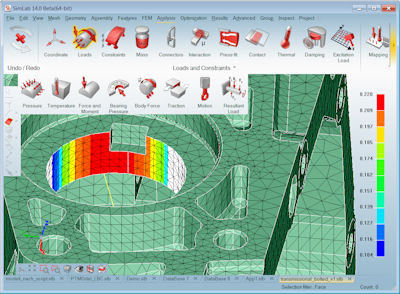 SimLab 14.0 introduces a new user interface that organizes functions into ribbons, and it uses icons to represent functions. Image courtesy of Altair Engineering Inc.
You can learn more about the new SimLab GUI from today's Pick of the Week write-up. But look over that then hit the link at the end. Take in the video on the page you land on to see what SimLab is all about. And tomorrow when you're dreading watching Thanksgiving Day football with your Neanderthal cousin, sneak off and watch the on-demand SimLab 14.0 rollout webinar. This is good stuffing, er, stuff.
Thanks, Pal. – Lockwood
Anthony J. Lockwood
Editor at Large, Desktop Engineering


Anthony J. Lockwood is Digital Engineering's founding editor. He is now retired. Contact him via [email protected].
Follow DE
Join over 90,000 engineering professionals who get fresh engineering news as soon as it is published.






About Us · Contact Us · Editorial Team · Advertising · Privacy Policy · Subscriber Services · © 2026 Digital Engineering 24/7 · Peerless Media