Helping design and engineering professionals discover, evaluate and specify technologies and processes that shorten the design cycle and enable success.


Alert!
Digital Engineering ceased publication on July 1, 2026. This website remains available as an archive of engineering content.
For inquiries or information, please email [email protected].

May 2026 Special Focus: Artificial Intelligence in Design and Simulation
In this Special Focus Issue, learn about the latest developments in the integration of artificial intelligence into engineering workflows.

April 2026 Special Focus Issue: Generative Design
In this Special Focus Issue, Digital Engineering takes a look at how generative design solutions can be used across different types of design problems and with a variety of manufacturing approaches to accelerate design space exploration, and…
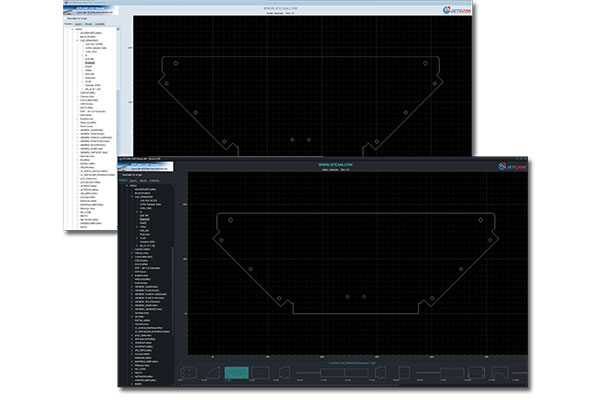
JETCAM, a company focused on advanced manufacturing software, reports a v4 update to its free CAD Viewer, offering an enhanced experience with several new features. The updated CAD Viewer delivers new features and usability improvements, providing more intuitive viewing of 2D CAD files on Windows PCs.
The new release focuses on improving functionality and a better interface experience. Key enhancements include:
The JETCAM CAD Viewer is a lightweight tool that requires little memory or hard disk space. It is designed to be installed alongside existing CAD/CAM software to provide one-click viewing of CAD files. The viewer is free, 'as is' and without warranty. It can be installed on an unlimited number of computers.
Additional benefits:
"The CAD Viewer is an essential install for anyone that frequently works with CAD files," says Martin Bailey, managing director of JETCAM.
The JETCAM CAD Viewer does not require any CAD packages to be installed to display thumbnail images. It is compatible with Windows 10 or above, and requires less than 100MB of hard disk space, and XGA graphics (1024x768) or above.
The updated version of the JETCAM CAD Viewer is available for immediate download here https://pages.jetcam.net/free-dxf-viewer.
Sources: Press materials received from the company and additional information gleaned from the company’s website.


DE's editors contribute news and new product announcements to Digital Engineering. Press releases may be sent to them via [email protected].
Follow DE






About Us · Contact Us · Editorial Team · Advertising · Privacy Policy · Subscriber Services · © 2026 Digital Engineering 24/7 · Peerless Media