Helping design and engineering professionals discover, evaluate and specify technologies and processes that shorten the design cycle and enable success.


Alert!
Digital Engineering ceased publication on July 1, 2026. This website remains available as an archive of engineering content.
For inquiries or information, please email [email protected].

May 2026 Special Focus: Artificial Intelligence in Design and Simulation
In this Special Focus Issue, learn about the latest developments in the integration of artificial intelligence into engineering workflows.

April 2026 Special Focus Issue: Generative Design
In this Special Focus Issue, Digital Engineering takes a look at how generative design solutions can be used across different types of design problems and with a variety of manufacturing approaches to accelerate design space exploration, and…
A seasoned editor once told me, "For every letter you receive, assume there are at least ten other readers who feel the same way but just didn't bother writing you."
When my article on direct-editing titled "Anticipating the Next Paradigm Shift in CAD" went live, I began accumulating emails from readers pointing out some of the software packages they felt deserved to be mentioned in it. IronCAD LLC.'s IronCAD, PTC's CoCreate, and Kubotek's KeyCreator topped the list.
But among them, KeyCreator users proved to be the most passionate. One wrote, "I couldn't help feeling a little frustrated at the lack of mention of CADKEY, now known as KeyCreator ... I'd like to encourage you to contact Kubotek ... I'm sure you will be writing again on the subject of direct modeling, and I would like to know that you have some exposure to a real pioneer of the technology."
That means there are at least ten others who feel this way, I thought. So I promptly got in touch with Kubotek, which was quite accommodating. Company officials gave me not only a copy of the software (KeyCreator 8.5) but also an introductory tutorial.
Kubotek's KeyCreator is unquestionably a direct editing modeler that deserves to be mentioned in the same breath as SpaceClaim, Solid Edge with Synchronous Technology, or Autodesk Inventor Fusion. The software allows you to edit or modify 3D solids with little or no concern for how they were created.
What sets it apart from some of its rivals may be its emphasis on primitive solids. The customary method of designing a part -- sketching a 2D profile and extruding it -- is available here too, but KeyCreator makes it easier to create 3D shapes by combining and subtracting primitive geometric shapes.
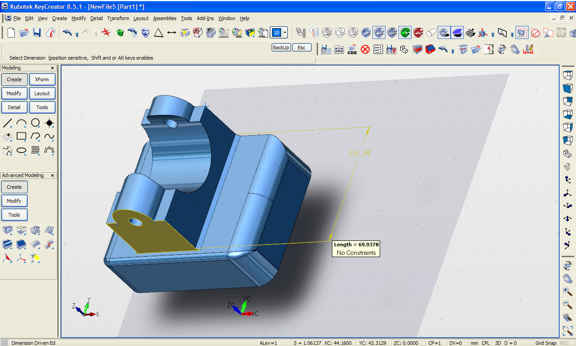
For better or worse, direct editing has also become associated with the ability to push and pull faces and features to deform or edit them -- something KeyCreator currently doesn't offer. The software's methodical approach requires you to follow a series of guided steps, via input dialog boxes and menu options.
On the other hand, I find KeyCreator's dimension-driven editing system to be superior to many others I've seen. By simply selecting the left, right, or center area of the dimension-indicator arrows, you can control which face -- or faces -- will be affected by the edit.
Kubotek officials indicate they are looking for ways to improve the modeling interface. Adding more dynamic editing functions (the kind seen among its rival CAD programs) is certainly under consideration. But the company faces a difficult balancing act. On the one hand, it must appeal to the SketchUp generation with a simpler push-pull interface; on the other hand, it cannot alienate its loyal customers by deviating too far from the familiar interface. There's no straightforward solution to this direct-editing conundrum.
Regardless, Kubotek's KeyCreator is a stellar 3D modeler, a pioneer that deserves a closer look.
To learn more about KeyCreator, watch the video clip below:


Kenneth Wong is Digital Engineering's resident blogger and senior editor. Email him at [email protected] or share your thoughts or suggestions at digitaleng.news/facebook.
Follow DE






About Us · Contact Us · Editorial Team · Advertising · Privacy Policy · Subscriber Services · © 2026 Digital Engineering 24/7 · Peerless Media