Helping design and engineering professionals discover, evaluate and specify technologies and processes that shorten the design cycle and enable success.


Sponsored
 Dear Desktop Engineering Reader:
COMSOL just released version 5.2 of its Multiphysics integrated software environment for creating and simulating physics-based models. Today's Check it Out link takes you to a webpage of COMSOL Multiphysics 5.2 highlights that's bulging with details and screenshots on modeling analyses in areas like fluids, heat transfer, plasma, radio frequency and structures. Here are a few notable updates.
One of the coolest aspects of COMSOL Multiphysics, besides the fact that it has 30-plus physics-specific add-on modules, is its Application Builder functionality. This capability lets experts build dedicated simulation apps for collaborating with other engineers and colleagues. COMSOL Multiphysics 5.2 debuts new editing tools that should make it easier to create user interfaces and build dynamic graphics.
Version 5.2 sees 50 new apps in its Application Library. You can just check out these apps or you can edit and use them to build your own. Among the new apps in Application Library are ones for things like thermoelectric cooling, heat exchangers, touchscreen design, magnetic prospecting, piezoacoustic transducers, muffler design, MEMS (micro-electro-mechanical systems) sensors and pressure vessels. Other app-related improvements include enhanced developer tools for enforcing quality standards and improved deployment controls.
Speaking of deployment, the company reports major enhancements on the COMSOL Server environment for running simulation apps over a corporate network or on the cloud. Key highlights are a new caching function that enables applications to start up to five times faster, and administrators now have the ability to assign a single application to launch when users log in.
Version 5.2 also introduces a new tetrahedral meshing algorithm and a new geometry operation called Partition Domains. The latter lets you partition selected domains in 2D and 3D by specifying curves and surfaces, which means you can subdivide a complex-shape area into a domain that's easier to mesh. The new tetrahedral mesher enables automatic meshing without making you fuss with mesh settings for large CAD geometries. Another neat new feature in 5.2 is the ability to add annotations and results in 2D and 3D plots.
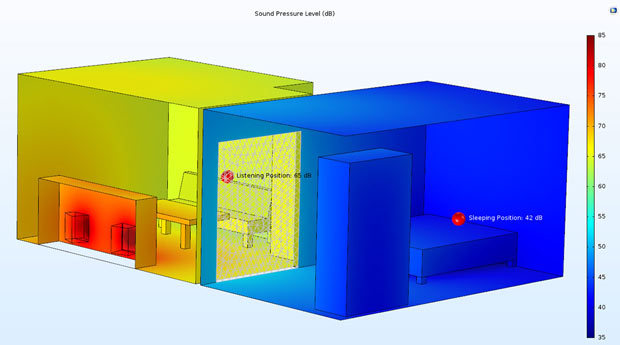 COMSOL Multiphysics version 5.2 introduces annotation plots that you can use to display custom text in 2D and 3D plots. COMSOL Multiphysics can fetch and insert into the text the results from evaluating expressions automatically. This screenshot shows annotations in a room acoustics model. Image courtesy of COMSOL Inc.
As always with COMSOL, there's a ton of stuff happening in most areas of the new release of COMSOL Multiphysics. Hit today's Check it Out link to learn more about version 5.2. Make sure to take in the video for a short overview of the release, and remember you can drill down into your area of interest using the links on the left-hand side.
Thanks, Pal. – Lockwood
Anthony J. Lockwood
Editor at Large, Desktop Engineering


Anthony J. Lockwood is Digital Engineering's founding editor. He is now retired. Contact him via [email protected].
Follow DE
Join over 90,000 engineering professionals who get fresh engineering news as soon as it is published.






About Us · Contact Us · Editorial Team · Advertising · Privacy Policy · Subscriber Services · © 2026 Digital Engineering 24/7 · Peerless Media