Helping design and engineering professionals discover, evaluate and specify technologies and processes that shorten the design cycle and enable success.



Digital Engineering April 2026
In the latest issue of Digital Engineering, we take a look at the latest innovations in design for additive manufacturing, including the use of natural language inputs, social media cosplayers, and AI integration. The issue also includes a feature…

January Special Focus Issue: Design for Additive
In this Special Focus Issue of Digital Engineering, learn about the latest advancements in design for additive manufacturing, including new software tools, additive in automotive, custom medical devices, and more.
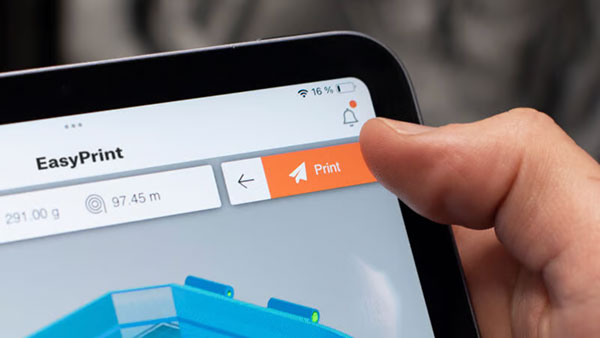
Prusa Research, the company of Czech developer and investor Josef Průša, has launched a new user-friendly 3D printing service. Prusa EasyPrint is available for free online and in the PRUSA mobile app, it allows for print file preparation directly on a mobile phone or tablet.
"For a long time, I've been thinking about a slicer that runs on any device and is so seamless that anyone can use it. I believe EasyPrint is one of those technologies that will feel completely natural to use in a few months, and we'll just wonder how we ever managed without it," says Prusa Research CEO Průša.
How does EasyPrint work? On your phone, tablet, or PC, you browse a public online database of 3D printing models and find one you like. With one button press, you get an interactive 3D preview, your 3D printers are automatically detected, and the correct print profiles are set. You can choose basic printing parameters, like the number of copies or the size of the object, and then click the PRINT button.
EasyPrint can be used by anyone from beginners and students with Chromebooks, to creatives using drawing tablets, as well as experienced users seeking quick remote print preparation.
A notable feature of EasyPrint is that it not only offers printing of pre-sliced G-codes, but allows the user to prepare the print.
"Imagine a classic 2D printer, existing solutions can be compared to someone telling you that you can only print one black and white copy on A4 paper, and you couldn't make any adjustments yourself. EasyPrint allows you to easily move, rotate, or scale, change the material type, automatically arrange a larger number of models on one or more virtual print beds, and so on," explains Průša.
G-code generation takes place in the cloud, allowing it to be used even on older phones. The development team focused on ease of use, and all more complex functions are intentionally hidden and set automatically. EasyPrint is fully integrated into the PRUSA mobile app and the Printables.com 3D model database. There's also a "cart system" on Printables where you can add models as you browse and then print them all at once.
The resulting print file can also be downloaded from EasyPrint and used on a printer that is not connected to the internet. Similarly, it is possible to upload a file to the application that is not available on Printables.com. "In the future, we plan to open this option to users of printers other than our own," adds Průša.
Sources: Press materials received from the company and additional information gleaned from the company’s website.


DE's editors contribute news and new product announcements to Digital Engineering. Press releases may be sent to them via [email protected].
Follow DE
Join over 90,000 engineering professionals who get fresh engineering news as soon as it is published.






About Us · Contact Us · Editorial Team · Advertising · Privacy Policy · Subscriber Services · © 2026 Digital Engineering 24/7 · Peerless Media