Helping design and engineering professionals discover, evaluate and specify technologies and processes that shorten the design cycle and enable success.


Alert!
Digital Engineering ceased publication on July 1, 2026. This website remains available as an archive of engineering content.
For inquiries or information, please email [email protected].

Cut Retrieval-Augmented Generation (RAG) Hallucinations by 50%
Most teams hit the same wall with enterprise AI: LLMs that hallucinate, pipelines that don’t scale, and infrastructure that’s harder to design than the models themselves.

What Is Intelligent BOM Management? A Guide to Smarter Product Development
Learn how intelligent Bill of Materials (BOM) management helps teams collaborate, reduce errors, and bring innovative products to market faster with cloud-based PLM tools.
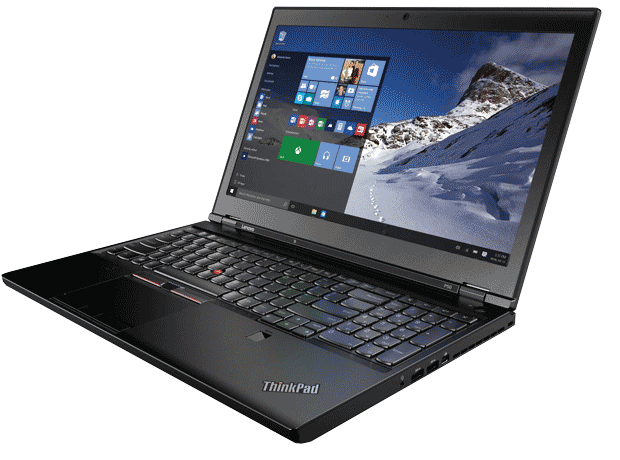 The Lenovo ThinkPad P50 is nearly identical to the P70, except smaller and lighter. Image courtesy of Lenovo.
Although base P50 configurations start at $1,322 for a system with a 2.6GHz Core i7 quad-core CPU, a 1920x1080 display, an NVIDIA Quadro M1000M GPU, 8GB of RAM and a 500GB 7200rpm drive, we received a fully-loaded version equipped with the same 2.8GHz Intel Xeon E3-1505M v5 Skylake processor, a 15.6-in. version of the gorgeous 4K UHD (3840x2160) IPS (in-plane switching) display panel, 16GB of 2133MHz ECC memory and a 512GB SSD (solid-state drive) PCIe-MVMe. Our ThinkPad P50 even included the color sensor and X-Rite Pantone calibration software like the P70.
In fact, the only significant difference between the P50 and P70 systems we received were the graphics. Our P50 came with an NVIDIA Quadro M2000M equipped with 4GB of GDDR5 memory and 512 CUDA cores. The ThinkPad P50 can accommodate up to 64GB of memory and two SSDs.
The right side of the P50 provides a single audio jack, two USB 3.0 ports, a mini DisplayPort connector, and a security lock slot, while the left side houses only an ExpressCard slot, SDXC slot and an optional Smart Card reader. The rear panel provides a single Thunderbolt 3/USB Type C connector, HDMI port, RJ45 Ethernet jack, two USB 3.0 ports including one that can charge devices, and the power connector. The bottom of the case features a docking port and a removable 6-cell battery that kept our system running for 4.6 hours.
Although equipped with the same CPU, memory and hard drive as the P70, the less-powerful GPU caused the ThinkPad P50 to lag behind its big brother in our benchmarks. That said, the P50 still outperformed most systems we tested last year. With a price as tested of just $2,353 the P50 is a great mobile system with ample power that is easier to carry and more affordable than its larger sibling.
| Lenovo ThinkPad P70 17.3-inch 2.8GHz Intel Xeon E3-1505M v5 quad-core CPU, NVIDIA Quadro M4000M, 16GB RAM | Lenovo ThinkPad P50 15.6-inch 2.8GHz Intel Xeon E3-1505M v5 quad-core CPU, NVIDIA Quadro M2000M, 16GB RAM | Dell 17.3-inch 2.9GHz Intel Xeon E3-1535M quad-core CPU, NVIDIA Quadro M5000M, 32GB RAM | Eurocom 17.3-inch 4.3GHz Intel Core i7-6700K quad-core CPU, NVIDIA Quadro M5000M, 64GB RAM | Dell Precision M3800 G2 15.6-inch 2.3GHz Intel Core i7-4712HQ quad-core CPU, NVIDIA Quadro K1100M, 16GB RAM | HP ZBook 14 G2 14-inch 2.6GHz Intel Core i7-5600U dual-core CPU, AMD FirePro M4150 and Intel HD Graphics 5500, 16GB RAM | |
| Price as tested | $3,623 | $2,353 | $3,890 | $6,781 | $2,109 | $2,115 |
| Date tested | 2/12/16 | 3/21/16 | 1/23/16 | 1/23/16 | 5/25/16 | 2/20/16 |
| Operating System | Windows 7 | Windows 10 | Windows 10 | Windows 10 | Windows 8.1 | Windows 8.1 |
| SPECviewperf 12 (higher is better) | ||||||
| catia-04 | 80.54 | 42.44 | 75.57 | 102.23 | 15.16 | 15.09 |
| creo-01 | 66.69 | 43.01 | 55.78 | 84.55 | 15.36 | 16.57 |
| energy-01 | 6.39 | 4.12 | 9.00 | 10.52 | 0.34 | 0.06 |
| maya-04 | 54.93 | 33.08 | 43.43 | 75.56 | 13.85 | 9.09 |
| medical-01 | 27.23 | 18.53 | 31.21 | 40.75 | 4.30 | 2.70 |
| showcase-01 | 46.70 | 22.02 | 48.07 | 45.87 | 8.55 | 7.58 |
| snx-02 | 112.86 | 60.01 | 63.33 | 87.30 | 15.30 | 20.06 |
| sw-03 | 88.04 | 64.70 | 82.02 | 121.63 | 25.41 | 29.21 |
| SPECapc SOLIDWORKS 2015 (higher is better) | ||||||
| Graphics Composite | 4.62 | 3.56 | 3.88 | 6.07 | 1.85 | 1.75 |
| Shaded Graphics Sub-Composite | 2.41 | 2.89 | 2.40 | 4.36 | 1.70 | 1.30 |
| Shaded w/Edges Graphics Sub-Composite | 3.42 | 3.63 | 3.21 | 5.58 | 2.27 | 1.32 |
| Shaded using RealView Sub-Composite | 3.41 | 2.95 | 2.85 | 5.07 | 1.57 | 1.16 |
| Shaded w/Edges using RealView Sub-Composite | 5.89 | 4.92 | 4.93 | 8.36 | 2.76 | 1.88 |
| Shaded using RealView and Shadows Sub-Composite | 3.87 | 2.68 | 2.94 | 5.17 | 1.38 | 1.39 |
| Shaded with Edges using RealView and Shadows Graphics Sub-Composite | 6.19 | 4.30 | 4.85 | 8.11 | 2.29 | 1.61 |
| Shaded using RealView and Shadows and Ambient Occlusion Graphics Sub-Composite | 7.97 | 3.30 | 5.70 | 6.81 | 1.12 | 2.90 |
| Shaded with Edges using RealView and Shadows and Ambient Occlusion Graphics Sub-Composite | 12.01 | 5.01 | 8.74 | 10.28 | 1.74 | 3.40 |
| Wireframe Graphics Sub-Composite | 3.02 | 3.26 | 2.99 | 3.76 | 2.36 | 2.27 |
| CPU Composite | 3.47 | 2.51 | 2.56 | 3.03 | 2.41 | 3.14 |
| SPECwpc v2.0 (higher is better) | ||||||
| Media and Entertainment | 2.60 | 2.43 | 2.57 | 3.38 | 1.22 | 0.87 |
| Product Development | 2.32 | 2.05 | 2.73 | 3.16 | 1.08 | 1.05 |
| Life Sciences | 2.56 | 2.49 | 3.18 | 3.91 | 1.12 | 0.90 |
| Financial Services | 1.14 | 1.15 | 1.19 | 1.40 | 0.96 | 0.53 |
| Energy | 2.27 | 1.86 | 2.66 | 3.13 | 1.09 | 0.66 |
| General Operations | 1.41 | 1.25 | 1.48 | 1.70 | 0.82 | 0.76 |
| Time in Seconds | ||||||
| Autodesk Render Test (lower is better) | 50.00 | 82.80 | 85.60 | 64.90 | 79.83 | 124.28 |
| Battery Test (higher is better) | 5:15 | 4:37 | 5:30 | 2:17 | 5:34 | 7:28 |
Numbers in blue indicate best recorded results. Numbers in red indicate worst recorded results.


David Cohn is a consultant and technical writer based in Bellingham, WA, and has been benchmarking PCs since 1984. He is a Contributing Editor to Digital Engineering, the former senior content manager at 4D Technologies, and the author of more than a dozen books. Email at [email protected] or visit his website at www.dscohn.com.
Follow DE
Join over 90,000 engineering professionals who get fresh engineering news as soon as it is published.






About Us · Contact Us · Editorial Team · Advertising · Privacy Policy · Subscriber Services · © 2026 Digital Engineering 24/7 · Peerless Media