Helping design and engineering professionals discover, evaluate and specify technologies and processes that shorten the design cycle and enable success.


Alert!
Digital Engineering ceased publication on July 1, 2026. This website remains available as an archive of engineering content.
For inquiries or information, please email [email protected].

May 2026 Special Focus: Artificial Intelligence in Design and Simulation
In this Special Focus Issue, learn about the latest developments in the integration of artificial intelligence into engineering workflows.

April 2026 Special Focus Issue: Generative Design
In this Special Focus Issue, Digital Engineering takes a look at how generative design solutions can be used across different types of design problems and with a variety of manufacturing approaches to accelerate design space exploration, and…
It took SolidWorks a while to release it, but eDrawings for the iPad is here, finally. As of this morning, the app is listed and available for purchase on Apple app store for $1.99.
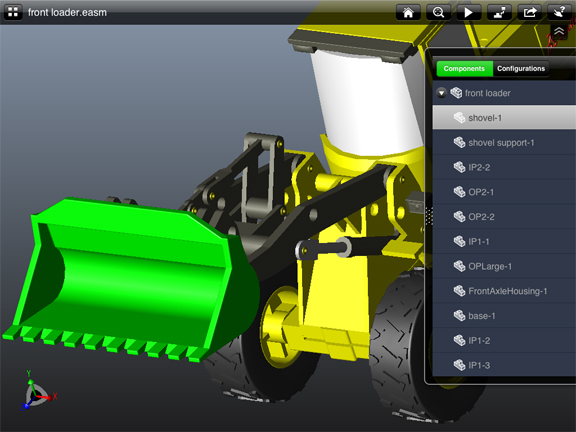
Like its counterpart for the desktop, eDrawings for the iPad gives you the ability to view, rotate, and explode SolidWorks models. In addition to viewing eDrawings files published from SolidWorks, the app also lets you load and view native SolidWorks models, DWG files, and DXF files. A floating pane lets you access the component tree in your assemblies, so you can use it to isolate and highlight subassemblies and parts. If your file is published with configurations (for example, an ink cartridge with or without handles), you may use the same pane to examine different configurations possible in the model.
Unlike the desktop version, the iPad version doesn't offer tools for annotation, cross-sectioning, and measurement. With limited functions, the iPad version is a simpler, lighter version compared to the desktop version. With the app installed, you may email supported files to yourself so you can view them on your mobile tablet. You may also load files directly to the app via iTunes while the device is connected to your computer.
As one of the free or low-cost CAD viewers now available for mobile devices, eDrawings for the iPad competes with Autodesk's AutoCAD WS, Autodesk Inventor Publisher Mobile Viewer, Lattice Technology's iXVL View, IMXI/Design's TurboView, CADFaster's CADFaster Collaborate, Dassault Systemes' 3DVIA Mobile, and a few others. Many of them can view DWG and DXF files -- two widely adopted formats for engineering drawings. Some also give you the option to edit or co-edit files. An advantage offered by eDrawings is the ability to open and view native SolidWorks parts and assemblies.


Kenneth Wong is Digital Engineering's resident blogger and senior editor. Email him at [email protected] or share your thoughts or suggestions at digitaleng.news/facebook.
Follow DE






About Us · Contact Us · Editorial Team · Advertising · Privacy Policy · Subscriber Services · © 2026 Digital Engineering 24/7 · Peerless Media