Helping design and engineering professionals discover, evaluate and specify technologies and processes that shorten the design cycle and enable success.


Alert!
Digital Engineering ceased publication on July 1, 2026. This website remains available as an archive of engineering content.
For inquiries or information, please email [email protected].

May 2026 Special Focus: Artificial Intelligence in Design and Simulation
In this Special Focus Issue, learn about the latest developments in the integration of artificial intelligence into engineering workflows.

April 2026 Special Focus Issue: Generative Design
In this Special Focus Issue, Digital Engineering takes a look at how generative design solutions can be used across different types of design problems and with a variety of manufacturing approaches to accelerate design space exploration, and…
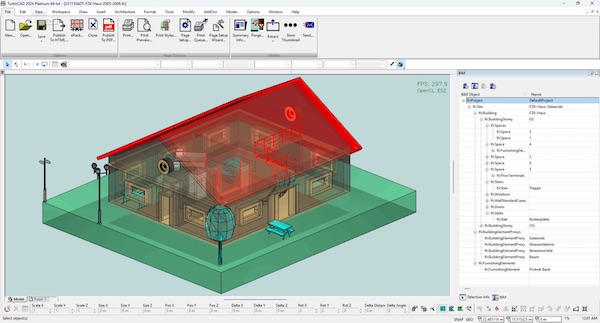
IMSI Design announced the TurboCAD 2025, which the company says includes more than 70 new features and improvements, including artificial intelligence (AI) tools.
TurboCAD 2025 introduces Smartly Organized Workspaces, which the company says will organize tools into dedicated environments tailored to specific tasks. TurboCAD’s pre-configured workspaces provide relevant tools for tasks such as drafting, 3D modeling, and creating architectural blueprints, helping to reduce setup time and streamline workflow.
The redesigned Start Page offers workspace selection, professional templates, theme customization, and instant previews of recent files. The Command Finder enables quick tool searches and direct command execution, reducing navigation time while keeping essential functions accessible.
The optional TurboCAD Copilot Professional plug-in introduces new AI-driven tools to enhance rendering workflows, provide deeper design insights, and facilitate part creation. The Rendering Scene Analysis tool delivers detailed scene insights, including inventories, material properties, light sources, and other critical data for photorealistic results, the company says. Enhanced reporting includes color marks, texture links, a dark theme, and raw HTML previews for optimized workflows. TurboCAD 2025 introduces aPart Creator and Part Editor for parametric creation and non-destructive editing of mechanical components.
TurboCAD 2025 builds on its TurboLux Rendering engine with new features like adjustable Ground Shadows, precise Tone Mapping for scene brightness, and improved defaults optimized for architectural visualization. Architects can design complex building envelopes using the Curtain Wall tool, which supports grid-based facade design, nested divisions, material assignments, and compatibility with industry-standard formats.
According to IMSI, TurboCAD 2025 ensures reliable collaboration with enhanced file handling capabilities, including ODA STEP Support, Teigha (ODA) 25.7 Update, and SketchUp 2024 Support.
Sources: Press materials received from the company and additional information gleaned from the company’s website.


DE's editors contribute news and new product announcements to Digital Engineering. Press releases may be sent to them via [email protected].
Follow DE






About Us · Contact Us · Editorial Team · Advertising · Privacy Policy · Subscriber Services · © 2026 Digital Engineering 24/7 · Peerless Media