Helping design and engineering professionals discover, evaluate and specify technologies and processes that shorten the design cycle and enable success.



Cut Retrieval-Augmented Generation (RAG) Hallucinations by 50%
Most teams hit the same wall with enterprise AI: LLMs that hallucinate, pipelines that don’t scale, and infrastructure that’s harder to design than the models themselves.

What Is Intelligent BOM Management? A Guide to Smarter Product Development
Learn how intelligent Bill of Materials (BOM) management helps teams collaborate, reduce errors, and bring innovative products to market faster with cloud-based PLM tools.
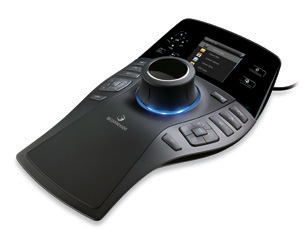 |
3Dconnexion has announced the new SpacePilot PRO. The company’s flagship 3D mouse is designed to deliver advanced control of 3D models, easier access to the power of professional 3D applications, fewer interruptions in the design workflow, and superior comfort. The SpacePilot PRO features a new color LCD workflow assistant, second-generation QuickView navigation technology, intelligent function keys, and an improved design.
The color LCD lists function-key assignments and provides at-a-glance access to Microsoft Outlook e-mail, calendar, and task lists. Through 3Dconnexion’s open software architecture, the workflow assistant can be customized to meet the needs of individuals, companies, and software vendors.
Five new dual-function QuickView navigation keys improve error detection, design review, and design presentation by providing one-touch access to the following views: top and bottom, right and left, front and back, two isometric views, and 90-degree view rotation of any view either clockwise or counter-clockwise—for a total of 32 views. A short press activates a key’s primary view command, while pressing and holding a key activates a secondary view command. In addition, new navigation setting keys offer simplified and customizable control, allowing professionals to turn pan-and-zoom, rotation and one-axis control on or off, making it easier to define navigation settings for certain work modes.
Five new customizable, dual-function keys offer one-touch access to 10 frequently used commands within supported 3D applications. The SpacePilot PRO automatically detects the active application and assigns appropriate function keys—whether default or customized. The color LCD denotes the function key assignments and application mode so engineers can identify commands and design states.
For more information, visit 3Dconnexion.
Sources: Press materials received from the company and additional information gleaned from the company’s website.


DE's editors contribute news and new product announcements to Digital Engineering. Press releases may be sent to them via [email protected].
Follow DE
Join over 90,000 engineering professionals who get fresh engineering news as soon as it is published.






About Us · Contact Us · Editorial Team · Advertising · Privacy Policy · Subscriber Services · © 2026 Digital Engineering 24/7 · Peerless Media