Helping design and engineering professionals discover, evaluate and specify technologies and processes that shorten the design cycle and enable success.


Alert!
Digital Engineering ceased publication on July 1, 2026. This website remains available as an archive of engineering content.
For inquiries or information, please email [email protected].

May 2026 Special Focus: Artificial Intelligence in Design and Simulation
In this Special Focus Issue, learn about the latest developments in the integration of artificial intelligence into engineering workflows.

Design & Simulation Software Guide 2025
In this Special Issue, Digital Engineering presents its second annual guide to design and simulation software vendors.
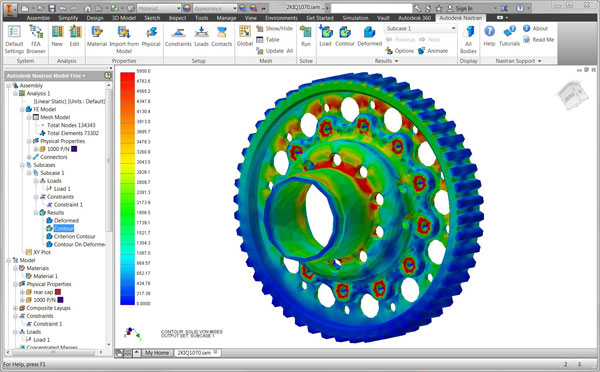
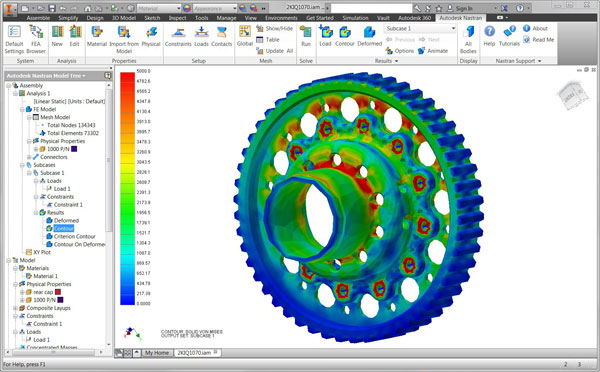 The new Nastran In-CAD works within both Autodesk Inventor and SolidWorks. Image courtesy of Autodesk.
Since 2008, Autodesk has invested in simulation software, adding the capabilities of Moldflow, Algor, CFdesign and Firehole Composites to its product line. Each addition added one more function — molding techniques, structural mechanics, computational fluid dynamics and composites analysis — to the company’s design, lifestyle and simulation toolbox. With the goal of helping customers create ever smaller, lighter, smarter and more-connected products, Autodesk has made another strategic move, tapping the power of industry-standard Nastran solver code. With Autodesk’s product launch of Autodesk Nastran 2015 and Autodesk Nastran In-CAD 2015, the company completes its May acquisition of NEi Software and strengthens its support of efficient digital prototyping across the product cycle.
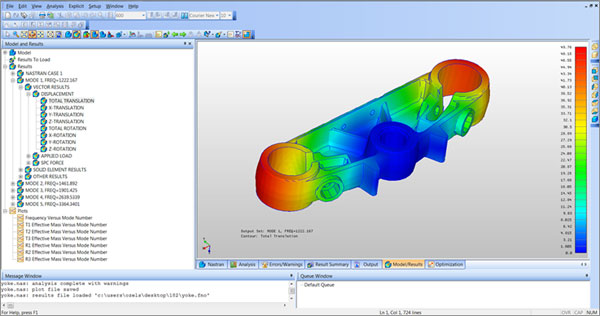 A screenshot of the Autodesk Nastran Editor. Image courtesy of Autodesk.
Derrek Cooper, director, Autodesk Simulation products, says, “To get the masses to do simulation and push multi-physics into the design space, you have to have ‘environmentally friendly’ materials. The software must address how to go from CAD to a mesh, how to handle large, complex models, and how to see an entire assembly simulated.” By adding NEi Nastran to Autodesk’s simulation flow, says Cooper, users now have another way to do all this, with a better way to access Nastran’s well-known capabilities in the up-front design space.
Two versions of the simulation product are available. For experienced Nastran engineers, Autodesk Nastran 2015 offers a higher level of simulation sophistication in a stand-alone, scalable package that can run on a desktop and/or take advantage of cloud resources as needed. For designers, the new Autodesk Nastran In-CAD 2015 package lets them do more complex analyses with different physics than before. Interestingly, Autodesk will firmly support the existing Nastran SolidWorks In-CAD package, and may even develop other CAD-centric offerings, such as a Nastran In-CAD for Creo from PTC.
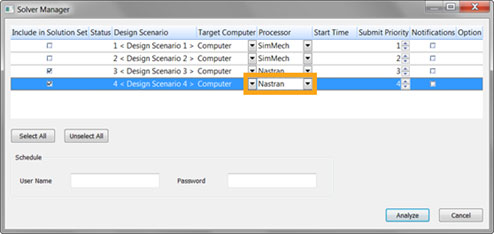 The Solver Manager enables end users to schedule and run multiple scenarios from a single dialog window. Image courtesy of Autodesk.
Successful up-front simulation must answer such questions as: Will my part fail? How light can I make it? Will it overheat? It must also answer those types of questions either inside the designer’s regular tools or at least easily alongside that software. Mitch Muncy, formerly of NEi Software and now Autodesk Simulation Nastran product manager, says that the new Autodesk products have embedded strong non-linear analysis capabilities such as buckling, normal modes, assembly modeling with contacts, transient response, random response, frequency response, impact analysis and drop test, all set up according to the familiar Nastran structure.
“Autodesk Simulation Mechanical 2015 has been enhanced,” explains Muncy, “so that you can go directly from here into the Autodesk Nastran solver.” All the previous capabilities are still there but now you can do a linear analysis both ways (your choice of solver, SimMech or Nastran is a simple click in the drop-down menu) and compare the results. A new editor helps users create the required “card deck” format for input to a Nastran simulation, and a real-time solver and output log tool ships with the software for managing the visual results. Muncy also notes that while people had gotten the impression it was necessary to dumb-down analysis to bring it into CAD, Autodesk Nastran In-CAD instead elevates CAD users to let them do advanced analysis in a familiar environment. Autodesk resellers will have improved training and be certified to help users with Nastran operations.
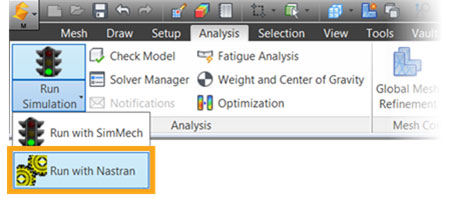 Autodesk Simulation Mechanical 2015 allows users to go directly into the Autodesk Nastran solver. Image courtesy of Autodesk.
Looking to the future, the company continues to expand beyond CAD into CAE. Autodesk discussed the six elements of its simulation strategy, which will particularly address customer needs for working with smart machines, advanced materials and additive manufacturing:
At a recent press event, Cooper presented an Autodesk view of what industry needs in future simulation technologies, from more customization options of explicit transient analyses to more detailed what-if simulations of composite parts built by different manufacturing configurations. Connecting design and manufacturing is another development project that would allow parts and assemblies to be simulated “as manufactured,” with the results looped back into design. One forward-looking product already available is FlowDesign, an automated external-flow wind tunnel simulation that is a one-click action within Autodesk Alias.
Perhaps the ultimate goal is the creation of a unified CAE simulation platform that presents a general modeling process analogous to the typical CAD software interface. It would operate on simplified, optimized geometry and perform simulations in the cloud, with results readily available for sharing and comparison to saved versions. Automatic definition of loads and boundary conditions will be a critical element of making this work for a broader spectrum of users.
Below are some video demonstrations of Autodesk Nastran that were produced by Autodesk:


Pamela Waterman worked as Digital Engineering's contributing editor for two decades. Contact her via DE-Editors@ digitaleng.news.
Follow DE
Join over 90,000 engineering professionals who get fresh engineering news as soon as it is published.






About Us · Contact Us · Editorial Team · Advertising · Privacy Policy · Subscriber Services · © 2026 Digital Engineering 24/7 · Peerless Media