Helping design and engineering professionals discover, evaluate and specify technologies and processes that shorten the design cycle and enable success.


Alert!
Digital Engineering ceased publication on July 1, 2026. This website remains available as an archive of engineering content.
For inquiries or information, please email [email protected].


May 2026 Special Focus: Artificial Intelligence in Design and Simulation
In this Special Focus Issue, learn about the latest developments in the integration of artificial intelligence into engineering workflows.

April 2026 Special Focus Issue: Generative Design
In this Special Focus Issue, Digital Engineering takes a look at how generative design solutions can be used across different types of design problems and with a variety of manufacturing approaches to accelerate design space exploration, and…
Autodesk shares what's new in Inventor 2020—a fresh new look and feel, continued customer-driven enhancements and professional grade functionality.
Over the next few weeks, customers will start to see Inventor 2020 available for download in their Autodesk Accounts and the Autodesk Desktop App. Calendar year 2019 marks 20 years of Inventor in the market, and Inventor 2020 delivers enhanced user interface and workflows, more professional grade functionality and even more customer-driven improvements. We wanted to get you ready for what you will see after installing Inventor 2020.
Inventor 2020 delivers a light theme interface with enhanced lighting styles, command icons and added graphic presets to change multiple view settings based on Performance, Quality or Balanced. Inventor 2020 also supports multi-monitor workflows so you can dock multiple Inventor files on different screens while working in a single Inventor session.
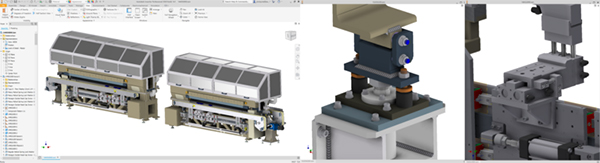
The Extrude, Sweep, Revolve and Thread commands have all been refreshed with the new property panel experience. Sketching was also enhanced to allow for more complex region and loop selection for your designs.
Enhancements were made from sketching to complex modeling to give new functionality to the core design tools and workflows. The Sweep command was enhanced to add the ability to sweep a tool body. The tool body can be any shape, and the sweep can both remove and add geometry.
New commands like Unwrap have been added. With Inventor 2020, you can use Unwrap to flatten nearly any set of faces into a flat surface. You can show this surface in a drawing or export it if needed.
Inventor 2020 continues to improve Frame Generator. This latest release moves many of the Frame Generator commands to the property panels. End Cap functionality was added and Notch, Miter, and Insert Frame workflows have all been improved.
Sources: Press materials received from the company and additional information gleaned from the company’s website.


Autodesk is a world leader in 3D design, engineering, and entertainment software. They produce software for the architecture, engineering, construction, manufacturing, media, and entertainment industries.

DE's editors contribute news and new product announcements to Digital Engineering. Press releases may be sent to them via [email protected].
Follow DE






About Us · Contact Us · Editorial Team · Advertising · Privacy Policy · Subscriber Services · © 2026 Digital Engineering 24/7 · Peerless Media