Helping design and engineering professionals discover, evaluate and specify technologies and processes that shorten the design cycle and enable success.


Alert!
Digital Engineering ceased publication on July 1, 2026. This website remains available as an archive of engineering content.
For inquiries or information, please email [email protected].

May 2026 Special Focus: Artificial Intelligence in Design and Simulation
In this Special Focus Issue, learn about the latest developments in the integration of artificial intelligence into engineering workflows.

April 2026 Special Focus Issue: Generative Design
In this Special Focus Issue, Digital Engineering takes a look at how generative design solutions can be used across different types of design problems and with a variety of manufacturing approaches to accelerate design space exploration, and…
This May, at AIA Convention (Moscone Center, San Francisco, California), AutoDesSys' founder and CEO Chris Yessios began handing out DVDs containing the beta release of bonzai3d. So I picked up one. It was literally a very small program. Without the materials and content library, the program folder was a mere 150 MB.
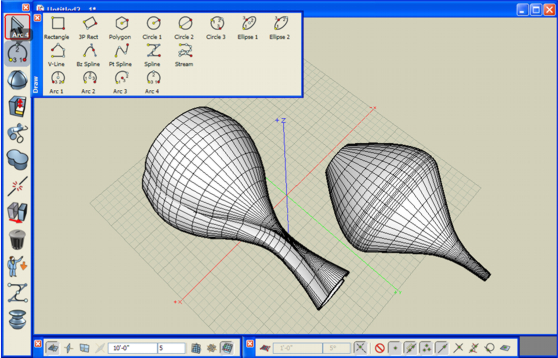
Nevertheless, the software works like a robust 3D package, with ample NURBS editing tools to produce complex geometric shapes and surfaces. It comes with a menu specific to architecture (walls, windows, and staircases that you can drag, drop, and resize, for example), but because of its ability to produce sweeping profiles, it could easily be deployed for conceptualizing consumer goods.
The interface is quite intuitive. Without watching the tutorial videos, I was able to start using it by experimentation. It offers a good collection of export options, including DWG, DXF, KMZ, 3D Studio, LightWave, and OBJ. The software had a few hiccups when I attempted to apply the Round or Taper command on some surfaces with odd profiles, but I expect these issues to go away when the code matures. You can try it out for yourself by downloading it from www.bonzai3d.com.
[Note: According to AutoDesSys, form.Z and bonzai3d are NURBS modelers, but can also do much more. Alexandra Yessios, the company's VP of marketing, said, "They have multiple personalities, including NURBS ... While we do as much as Rhino does with NURBS, we do more types of modeling: facetted, smooth, subdivisions, metaballs, coons patches, etc. (the latter three in form.Z only)."]
For more, watch the video clip below.


Kenneth Wong is Digital Engineering's resident blogger and senior editor. Email him at [email protected] or share your thoughts or suggestions at digitaleng.news/facebook.
Follow DE






About Us · Contact Us · Editorial Team · Advertising · Privacy Policy · Subscriber Services · © 2026 Digital Engineering 24/7 · Peerless Media