Helping design and engineering professionals discover, evaluate and specify technologies and processes that shorten the design cycle and enable success.


Alert!
Digital Engineering ceased publication on July 1, 2026. This website remains available as an archive of engineering content.
For inquiries or information, please email [email protected].

May 2026 Special Focus: Artificial Intelligence in Design and Simulation
In this Special Focus Issue, learn about the latest developments in the integration of artificial intelligence into engineering workflows.

April 2026 Special Focus Issue: Generative Design
In this Special Focus Issue, Digital Engineering takes a look at how generative design solutions can be used across different types of design problems and with a variety of manufacturing approaches to accelerate design space exploration, and…
Dear DE Reader:
I want to tell you about item’s Engineeringtool, a nifty browser-based application for designing and specifying custom carts, racks, trolleys, gantries, conveyors, industrial workstations, protective enclosures, working platforms and lots of other specialty items used to make testing, assembling and manufacturing more productive. But first, a quick history lesson is in order.
item was founded by two German engineers in 1976 to design, build and market specialty machinery. Seeing how time-consuming and expensive it was to manufacture shop machines for specialists, item’s founders had figured out (and patented) a better modular approach using slotted aluminum profiles and slide-in fasteners that they began offering as machine building kits. Each kit is a bit like an industrial-strength Erector Set, but easier because of item’s slot-and-fastener system.
OK, history lesson is over. Let’s talk about what item is doing today. The company has taken the custom kit-building idea into the digital age with its browser-based item Engineeringtool. Fire up a web browser and you’re ready to begin designing and virtually assembling your next productivity boosting solution in 3D.
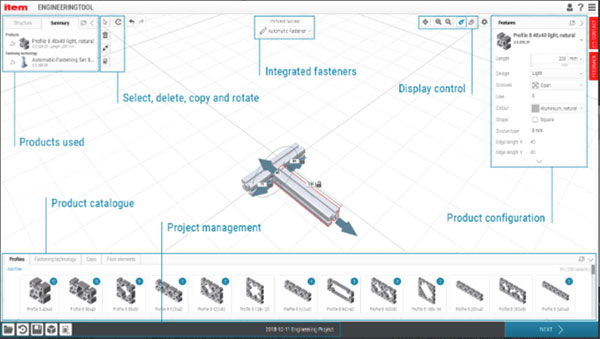
By default, the tool consists of a big central work area; a bottom menu showing the company’s product catalogue, organized by tabs; a product menu on the left to keep track of or reorder the products you’ve added to the design; and a configuration menu on the right to dig into those products’ specifications and modify them as needed. There is also a pull-down menu to control the type of integrated fasteners you’d like to use. And, of course, there are icons for commonly used viewing and design functions. The company has done an impressive job of making an online tool that is easy enough for anyone to use—no CAD expertise required. If you’re the CAD guru in the office, your co-workers don’t have to come to you for help. However, each main menu is just a click away from expanding to access more advanced options for power users.
Let’s start by choosing a particular profile—a cross-sectional representation of the aluminum object that shows its various slot locations—from the item catalogue menu. As soon as you do, the fasteners associated with that profile automatically populate. You can just drag-and-drop objects to digitally assemble your design, knowing that the objects you selected will work together. Make the objects longer, rotate them and connect them. The software visually warns of any errors.
The company’s engineering roots show when you’re using the item Engineeringtool. In a few minutes you’ll have designed a test bench that perfectly suits your needs, or a custom trolley to help the guys in the shop improve their productivity without breaking their backs, or even a full conveyor system. Cool stuff, but the magic happens when it’s time to turn that digital product into something real.
With the click of a button, you can download documentation that includes a scale drawing, bill of materials (BOM) and an order of operations assembly guide. Clicking another button lets you download the CAD data so you can incorporate your design into a larger system or see how it fits into a 3D model of your shop floor. When you’re ready to order, another button adds the profiles, fasteners and accessories used in your design to an online shopping cart to send an inquiry. You get the whole enchilada as a construction kit. Just unpack it and put it together.
What began as a couple of engineers designing and making specialty equipment 40+ years ago has evolved into an online tool for today’s digital design engineer. Check it out. It’s fun and free to use, and is sure to give you some ideas on how you could improve your company’s productivity with custom equipment from item.
Thanks for reading DE.
— The Editors


DE's editors contribute news and new product announcements to Digital Engineering. Press releases may be sent to them via [email protected].
Follow DE






About Us · Contact Us · Editorial Team · Advertising · Privacy Policy · Subscriber Services · © 2026 Digital Engineering 24/7 · Peerless Media