Helping design and engineering professionals discover, evaluate and specify technologies and processes that shorten the design cycle and enable success.


Alert!
Digital Engineering ceased publication on July 1, 2026. This website remains available as an archive of engineering content.
For inquiries or information, please email [email protected].

May 2026 Special Focus: Artificial Intelligence in Design and Simulation
In this Special Focus Issue, learn about the latest developments in the integration of artificial intelligence into engineering workflows.

Design & Simulation Software Guide 2025
In this Special Issue, Digital Engineering presents its second annual guide to design and simulation software vendors.
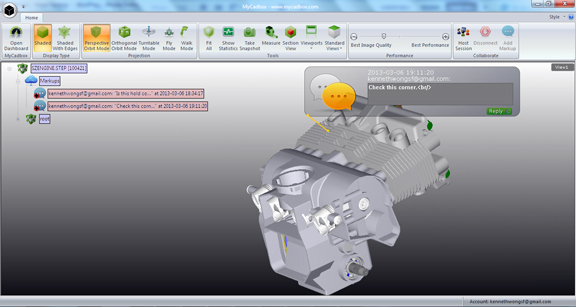
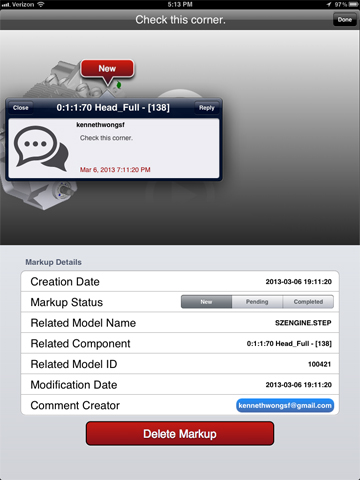
What would a version of Dropbox customized for CAD users be like? It would probably look like MyCadbox, a cloud-hosted virtual storage space for STEP files. The online product comes from the same company that developed and released CadFaster, a viewing and markup program for CAD users. Like CadFaster, MyCadbox is three complementary offerings -- a private storage online, a desktop client app, and a mobile app -- that form a single product.
Tuomas Holma, the company's VP of sales and marketing, explained that, when CadFaster studied its user based, he found out "75% of the files opened are STEP formats; the other 25% are DWG, DXF, and IGES." That's why the new storage product concentrates on STEP.
MyCadbox is based on CadFaster QuickStep, a similar product that supports STEP, DWG, DXF, IGES and HSF files. Holma assured that QuickStep will continue to be available for those who prefer it.
Dropbox uses a quota system to provide free users and paid users with different storage capacity. MyCadbox uses a model limit: 10 models max for free users, 100 model max for $9.99 per month. You can use MyCadbox to share a file with someone or host a coviewing session: multiple people collaborating on the same STEP file. The STEP models have no size limit; coviewing can accommodate as many as 10 simultaneous users, according to Holma.
The desktop client for MyCadbox has basic viewing and markup functions, such as cross-sectioning and annotation. Annotations made in the desktop version are instantly synched to the cloud-hosted version; therefore, the iPad app reflects the latest changes once refreshed.
The appeal of MyCadbox is its ability to synchronize the desktop client's view, iPad app's view, and browser-visible content. With this approach, the devices and the apps function as doorways to the cloud-hosted portal and its content. No additional effort is required from the user (or users, in coviewing sessions) to keep all the apps in sync.
For more, watch the video report below:


Kenneth Wong is Digital Engineering's resident blogger and senior editor. Email him at [email protected] or share your thoughts or suggestions at digitaleng.news/facebook.
Follow DE






About Us · Contact Us · Editorial Team · Advertising · Privacy Policy · Subscriber Services · © 2026 Digital Engineering 24/7 · Peerless Media