Helping design and engineering professionals discover, evaluate and specify technologies and processes that shorten the design cycle and enable success.



May 2026 Special Focus: Artificial Intelligence in Design and Simulation
In this Special Focus Issue, learn about the latest developments in the integration of artificial intelligence into engineering workflows.

Design & Simulation Software Guide 2025
In this Special Issue, Digital Engineering presents its second annual guide to design and simulation software vendors.
Autodesk has released Netfabb 2019.1 with a number of enhancements, and leading the list of updates are latticing, the new “CAD-friendly” interface, new machine integrations and some updates to Netfabb simulation.
Netfabb 2019 brought manual latticing to customers subscribing at the Premium tier and now with 2019.1, Lattice Commander is live and out of tech preview, which means manual lattice editing is now fully functional. Also, for those subscribing to Netfabb Ultimate with access to Optimization Utility, you can now manually edit those FEA optimized lattices. Here are the highlights:
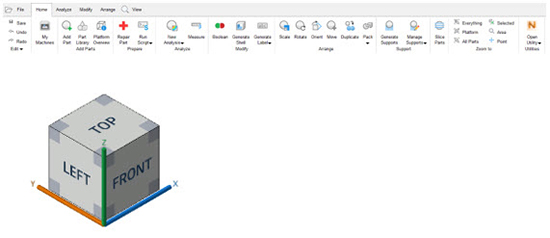
With Netfabb 2019.1, you are presented with a new UI ribbon that should be more intuitive for those of you working in CAD, plus you will see the familiar view cube and in-canvas manipulators. Upon launch of Netfabb, you also have the opportunity to revert back to the traditional menu you already know.
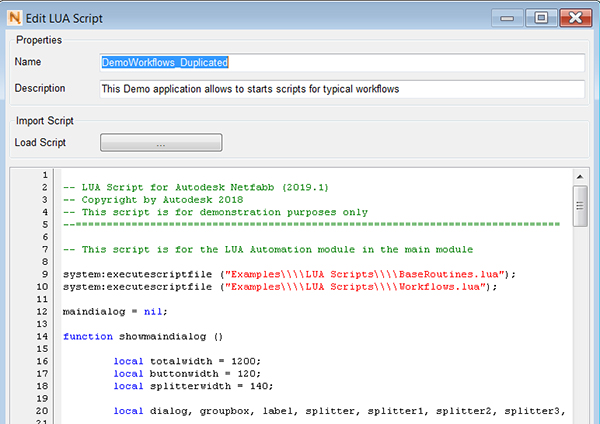
Lua scripting available in Netfabb Ultimate can be helpful for repetitive tasks. Now with 2019.1, you will find new scripts for Lane Packing and Multi-Tray Packing.
Netfabb can control all Arcam machines, that workspaces for all existing SLM Solutions machines have been updated and workspaces have been added for the newest models: SLM 280.2 and SLM 800. New workspaces have also been introduced for the Xact metal XM200C and XM200S and the Sinterit Pro Lisa. Netfabb has integrated workspaces for over 100 machines, for every AM process.
A lot of validation and testing goes into Netfabb simulation with the goal of successful metal additive prints the first time, the company notes. 2019.1 introduces a few new updates to help:
There are Support Module improvements: Tested support scripts, tapered volume supports, fully automatic support update as parts are moved or rotated, and usability improvements.
Look for Custom Scene templates: Define custom start-up conditions for different machines.
Also highlighted are the Slice Distribution Statistics: Graph showing distribution of contour area through Z-axis provides a quick overview where closed contours (indicating a fully exposed area) are located across the slice stack.
Another enhancement is the automatic base plate creation: Create a foundation or “raft“ for parts based on their contour.
Sources: Press materials received from the company.


Autodesk is a world leader in 3D design, engineering, and entertainment software. They produce software for the architecture, engineering, construction, manufacturing, media, and entertainment industries.

DE's editors contribute news and new product announcements to Digital Engineering. Press releases may be sent to them via [email protected].
Follow DE
Join over 90,000 engineering professionals who get fresh engineering news as soon as it is published.






About Us · Contact Us · Editorial Team · Advertising · Privacy Policy · Subscriber Services · © 2026 Digital Engineering 24/7 · Peerless Media