Helping design and engineering professionals discover, evaluate and specify technologies and processes that shorten the design cycle and enable success.


Alert!
Digital Engineering ceased publication on July 1, 2026. This website remains available as an archive of engineering content.
For inquiries or information, please email [email protected].

May 2026 Special Focus: Artificial Intelligence in Design and Simulation
In this Special Focus Issue, learn about the latest developments in the integration of artificial intelligence into engineering workflows.

April 2026 Special Focus Issue: Generative Design
In this Special Focus Issue, Digital Engineering takes a look at how generative design solutions can be used across different types of design problems and with a variety of manufacturing approaches to accelerate design space exploration, and…
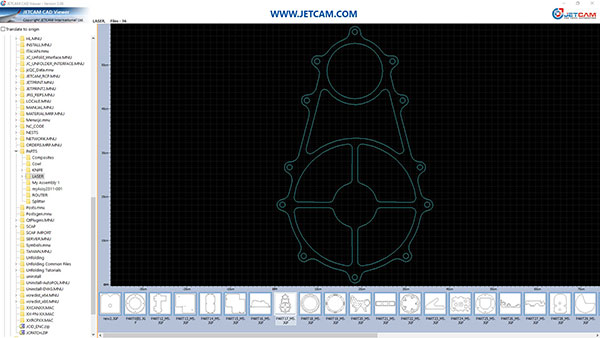
JETCAM, provider of advanced manufacturing software, announces an update to its free CAD Viewer, offering users an enhanced experience with several new features. The updated CAD Viewer is a free tool that allows for viewing of all major 2D CAD files on a PC.
The new release focuses on improving usability and providing users with more control over their files. Key enhancements include:
The JETCAM CAD Viewer is a lightweight tool that requires little memory or hard disk space. It is designed to be installed alongside existing CAD/CAM software to provide a one-click viewing of CAD files.The viewer is provided free, "as is" and without warranty and can be installed on an unlimited number of computers.
Other features of the JETCAM CAD Viewer include:
No adverts, spyware, or malware and does not require an internet connection.
Small memory footprint, running at around 40MB.
Simple tree view for local and mapped network drives.
Thumbnail images of all recognized 2D CAD files, including JETCAM JGF component files, DWG, DXF and IGES.
Can be set to be default viewer: During installation, you can choose if you want the CAD Viewer to be the default viewer for any of the supported file formats.
Measurement rules showing scale of part.
Pan and zoom with the mouse.
"The CAD Viewer is an essential install for anyone that regularly needs to view common CAD files," says Martin Bailey, managing director of JETCAM. "It installs within seconds, needs no configuration, and is extremely quick to use and navigate."
The JETCAM CAD Viewer does not require any CAD packages to be installed to display thumbnail images. It is compatible with Windows 10 or above, and requires 52 MB of hard disk space, and XGA graphics (1024x768) or above.
The updated version of the JETCAM CAD Viewer is availablef or immediate download. More information is available on the JETCAM website. The CAD viewer can be downloaded directly here.
Sources: Press materials received from the company and additional information gleaned from the company’s website.


DE's editors contribute news and new product announcements to Digital Engineering. Press releases may be sent to them via [email protected].
Follow DE
Join over 90,000 engineering professionals who get fresh engineering news as soon as it is published.






About Us · Contact Us · Editorial Team · Advertising · Privacy Policy · Subscriber Services · © 2026 Digital Engineering 24/7 · Peerless Media