Helping design and engineering professionals discover, evaluate and specify technologies and processes that shorten the design cycle and enable success.


Alert!
Digital Engineering ceased publication on July 1, 2026. This website remains available as an archive of engineering content.
For inquiries or information, please email [email protected].

May 2026 Special Focus: Artificial Intelligence in Design and Simulation
In this Special Focus Issue, learn about the latest developments in the integration of artificial intelligence into engineering workflows.

April 2026 Special Focus Issue: Generative Design
In this Special Focus Issue, Digital Engineering takes a look at how generative design solutions can be used across different types of design problems and with a variety of manufacturing approaches to accelerate design space exploration, and…
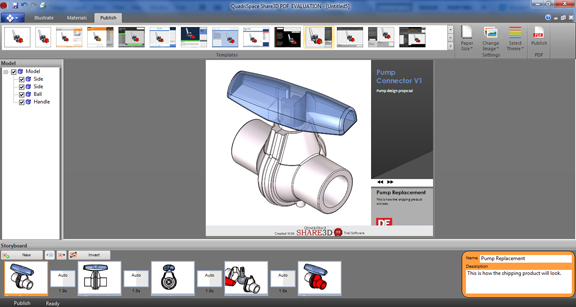
QuadriSpace, which specializes in developing software for 3D data reuse, is taking a dramatic step to reach out to more people than ever. Its latest product, SHARE3D PDF ($199, with $49 for maintenance), gives you a template-driven approach to creating interactive 3D PDF documents.
The software comes with robust support for industry-standard neutral files (STL, IGES, STEP, OBJ, and so on), along with the ability to import native parts from SketchUp, Rhino, AutoCAD, SolidWorks, and Autodesk Inventor. Once the CAD file is in SHARE3D PDF, you'll see the model, along with its model tree (for assemblies with structures).
SHARE3D PDF lets you work by creating illustrations (they work like keyframes), with editable backdrops and text fields. There's a basic material library so if your model lacks luster, you may apply some common materials (glass, metal, paint, plastic, and so on). But bear in mind, the stock library is very basic and the program is not meant for producing impressive renderings.
Moving parts around is fairly straightforward. You can use the Move Parts tool under the Illustrate tab to drag components along an axis. (No part rotation option is provided, however.) The software comes with a rich set of templates (found under the Publish tab), with preset text fields and placeholders for logos and corporate images.
A few quirks I noticed: When in layout mode under the Publish tab, there's little or no text formatting options, so you're stuck with the text as formatted in the template. There's not a lot of options to resize the fields in the template, so it's difficult to see how the published results will look in cases where the text flows beyond designated space. By default, the layout window always displays the entire page, with no option to zoom into a specific area (for instance, to a specific text field or image). So depending on your monitor size, your text fields may appear too small, making it difficult to proofread as you type. I can't find support for auto-correction or spell-check either, which makes proofreading all the more important.
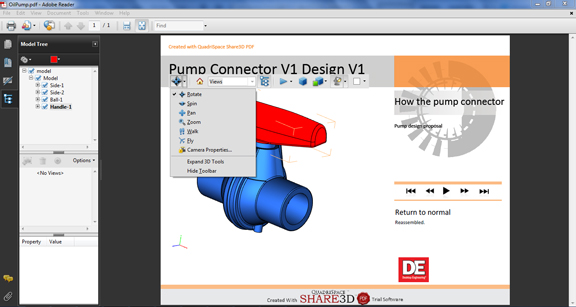
The published documents are complete with active buttons, allowing the recipient to follow along your presentation flow. The software adds animation to provide transitions from one keyframe to another. Since the document is 3D PDF, if you have a reader capable of visualizing 3D PDF, you'll be able to spin, rotate, and inspect cross-sectional views of the embedded model.
SHARE3D PDF is QuadriSpace's entry-level product, designed to whet your appetite so you'll consider its other titles: Pages3D and Publisher3D. It's strictly for publishing and sharing 3D PDFs, not a viewing and markup program, nor a rendering application. The software works quite well for those who just need to share a design idea with someone, with some built-in interactivity. The rich template collection lets you create a set of PDF sheets with different views without putting in a lot of effort to create a pleasant layout.
At $199, SHARE3D PDF is worth considering just for the PDF creation alone. You'll need to spend at least $299 for a copy of Acrobat X Standard from Adobe just to get the ability to publish PDF documents. (Whereas the PDF viewer is free, PDF publishing products from Adobe require a cost.)


Kenneth Wong is Digital Engineering's resident blogger and senior editor. Email him at [email protected] or share your thoughts or suggestions at digitaleng.news/facebook.
Follow DE






About Us · Contact Us · Editorial Team · Advertising · Privacy Policy · Subscriber Services · © 2026 Digital Engineering 24/7 · Peerless Media