Helping design and engineering professionals discover, evaluate and specify technologies and processes that shorten the design cycle and enable success.



May 2026 Special Focus: Artificial Intelligence in Design and Simulation
In this Special Focus Issue, learn about the latest developments in the integration of artificial intelligence into engineering workflows.

April 2026 Special Focus Issue: Generative Design
In this Special Focus Issue, Digital Engineering takes a look at how generative design solutions can be used across different types of design problems and with a variety of manufacturing approaches to accelerate design space exploration, and…
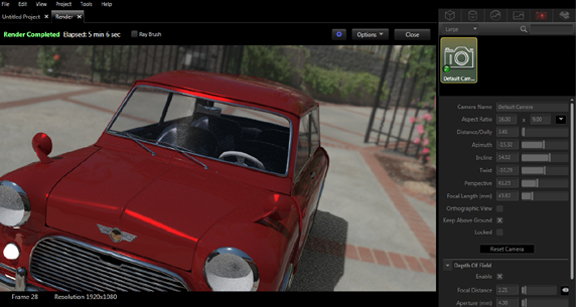
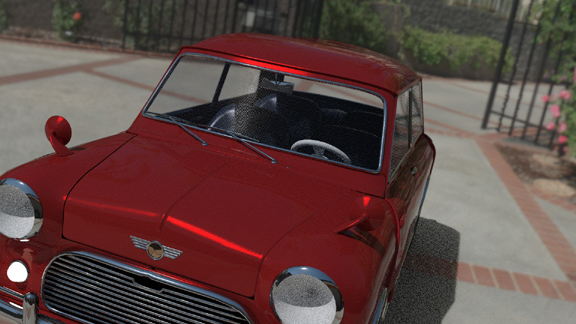
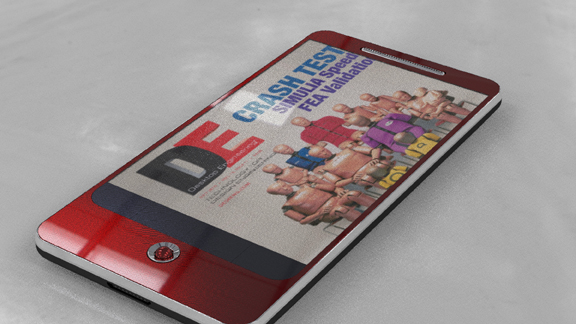
If you're a photographer, you may be eying Bunkspeed SHOT with a mix of anxiety and envy. The software has been described as a virtual camera for good reasons. It lets you compose scenes using 3D files, add materials and textures, place them against panoramic backdrops, then create digital images that would rival professional photography.
You might be familiar with SHOT's predecessor, HyperShot. (For a report on HyperShot V1.9, watch this video.) According to Bunkspeed, the new version branded SHOT takes advantage of GPU rendering, whereas the previous versions were confined to CPU rendering only. That's good news for those running workstations equipped with professional-level GPUs like NVIDIA Quadro series.
There are a few notable improvements to the interface in SHOT. For instance, you can now turn on or turn off ray tracing with a single click. This lets you set up your scenes more quickly, without the heavy burden imposed by light calculation. When everything is in place, you can turn ray tracing back on to render the final image.
You may also use the ray brush tool to focus all your rendering horsepower on a single region. This lets you preview important elements, like an embossed logo or a chrome button, without having to render the whole scene in high resolution.
The model tree lets you expand your model structure and sort the stack of components within it, allowing you to easily pick out the group of polygons you need to edit. It also lets you copy and paste the object to create duplicates. You can, for instance, spawn an entire series of iPhones in different materials and colors from a single iPhone model.
In SHOT, enabling and adjusting depth of field is simple and effective. You use a series of sliders to define the distance between your virtual camera and your point of focus. You can also add decals, or project 2D images on your 3D models, by loading an image as texture color.
But the same slider controls that work well for depth of field seem cumbersome for image positioning. At least to me, scaling, rotating, stretching, and mapping an picture to the desired area through a series of slider bars is not that intuitive. It takes some trials and errors to get it right. Ideally, I'd prefer to grab the image from its corners or borders (like I would in Adobe Illustrator) and manipulate it as I see fit.
In HyperShot, there's almost no easy way to edit the scene's light source or add a new light source (like a spot light). SHOT offers a workaround to address this. You can use the software to add a primitive shape (for instance, a cone or a cylinder) to the scene, apply a bright material, then hide the object itself so your rendering benefits from its brightness but doesn't show the light object itself. In my view, the method is a bit awkward. Perhaps it's an evolutionary step towards a more straightforward light-manipulation tool in a future release.
Both in interface and performance, SHOT is a notable improvement from its previous incarnations. Mechanical CAD programs rarely serve as the ideal environment for creating eye-catching digital images. But with SHOT, you can transform your 3D models into brochure-worthy renderings.
To look at the images created in Bunkspeed SHOT, visit the photo album at DE Exchange here.
A review of Luxion KeyShot, one of Bunkspeed SHOT's main rivals, in is available here.
For a comparison of the renderings produced in Bunkspeed SHOT and Luxion KeyShot, view images here.
A detailed review of Bunkspeed SHOT is set to appear in an upcoming issue of Desktop Engineering. For more on Bunkspeed SHOT, watch the video report below:


Kenneth Wong is Digital Engineering's resident blogger and senior editor. Email him at [email protected] or share your thoughts or suggestions at digitaleng.news/facebook.
Follow DE
Join over 90,000 engineering professionals who get fresh engineering news as soon as it is published.






About Us · Contact Us · Editorial Team · Advertising · Privacy Policy · Subscriber Services · © 2026 Digital Engineering 24/7 · Peerless Media