Helping design and engineering professionals discover, evaluate and specify technologies and processes that shorten the design cycle and enable success.


Alert!
Digital Engineering ceased publication on July 1, 2026. This website remains available as an archive of engineering content.
For inquiries or information, please email [email protected].


Digital Engineering April 2026
In the latest issue of Digital Engineering, we take a look at the latest innovations in design for additive manufacturing, including the use of natural language inputs, social media cosplayers, and AI integration. The issue also includes a feature…

January Special Focus Issue: Design for Additive
In this Special Focus Issue of Digital Engineering, learn about the latest advancements in design for additive manufacturing, including new software tools, additive in automotive, custom medical devices, and more.
Moving a design from CAD to a high-quality print in an additive manufacturing (AM) setting can encompass choosing from or incorporating multiple types of software tools. These tools (and their respective new capabilities) are designed to enhance how engineers prepare and share their designs with the manufacturing team that outputs the final print.
There are typically several steps involved in transferring designs from CAD to print in AM. These can include: CAD design, slicer (import to AM software), build prep (a slicing phase involving support generation), simulation and inspect, sending to printer, and post-processing.
This article is intended to serve as a basic-level snapshot of AM software tools. DE reached out to various AM companies with software solutions. Following is just a sampling of tools on the market (based on companies reached) and the respective categories best representing the tools’ capabilities.
PTC, software developer of solutions spanning the product lifecycle, offers two CAD-oriented AM tools: Creo and Onshape.
“Creo is PTC’s fully integrated 3D CAD (computer-aided design) solution that allows engineers to seamlessly conceptualize, analyze, validate and collaborate with manufacturing,” says Brian Thompson, general manager, Creo CAD Business, PTC.
Creo’s capabilities are suited to the aerospace & defense, automotive and medical technology fields, according to PTC. This solution features lattice capabilities integrated into Creo’s work environment, so “engineers can optimize design with simulation-based lattice structures,” Thompson notes.
In addition to Creo, PTC offers Onshape, a cloud-native CAD platform supporting AM workflows. Engineers can design parts directly in Onshape, according to Thompson, and export them in 3D printing formats like STL and 3MF, enabling compatibility with various slicing software options and 3D printers.
“Onshape’s cloud-based architecture facilitates real-time collaboration, allowing teams to iterate quickly and streamline the prototyping process,” Thompson explains. This solution is intended for applications needing rapid development cycles (think, consumer electronics and robotics).
“These tools [Creo and Onshape] allow users to design, optimize, validate and prepare models for 3D printing within a single environment, which streamlines workflows, reduces errors and accelerates time to market,” Thompson shares.
In the slicing category, 3D printing manufacturer and software developer Ultimaker offers Cura, a free, easy-to-use slicing tool, and Digital Factory, a platform that lets users slice, queue and print files while also managing connected printers.
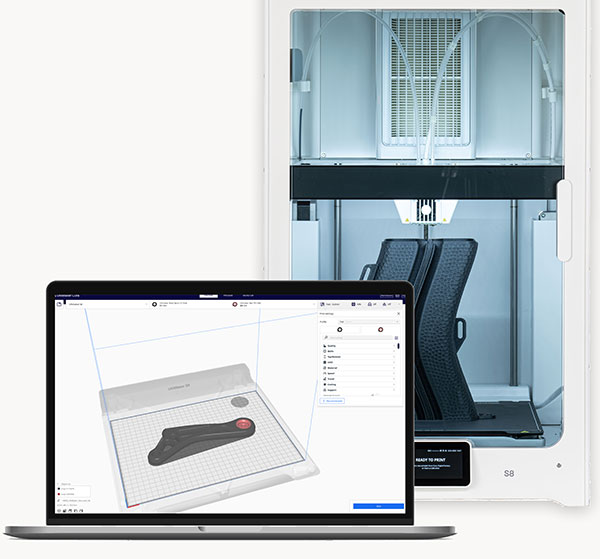
Cura, Ultimaker’s most popular slicer tool, can produce optimized print profiles for UltiMaker profiles and printers. Image courtesy of Ultimaker.
Cura, Ultimaker’s most popular slicer, according to Arjen Dirks, vice president, Product & Technology, can produce optimized print profiles for Ultimaker profiles and printers, and it is linked to the Ultimaker Marketplace.
“It’s printer-agnostic, allowing all 3D printer brands to create a profile for their printers, removing any barriers for people who want to use the platform for their printer of choice,” Dirks says. Cura is also open source, allowing access to its code for anyone to view, use or change.
Digital Factory is Ultimaker’s other AM software solution that lets users slice, manage, queue and send their prints to their connected printers through the cloud, according to Dirks. He notes, however, that Digital Factory is limited to Ultimaker printers (which includes MakerBot printers as well).
At EOS, an industrial 3D printing solutions developer, Mirco Schopf, EOS product line business owner of Software, says the company offers tailored software solutions for various AM workflow phases. Its solutions are available via a subscription model called “EOS Plans.”
The data prep-oriented plans are as follows:
EOS Build (for metal) includes the most relevant functions of the EOSPRINT data preparation and job optimization software. (EOSPRINT, EOS’ widely used software tool, is supplied in EOS Build.) The functions in EOS Build “enable the optimization of process parameters and the management of material consumption,” Schopf explains. It also includes cloud-based EOS Hub, where machine data and machine utilization data can be accessed.
“The data preparation tool is an intuitive, open and productive application that makes it possible to optimize data preparation for EOS systems,” Schopf says. “It is a relevant component for the creation, calculation and optimization of designs in the context of print data preparation and is crucial for the successful development of components.”
EOS Build Polymer Plan is software for data preparation and order optimization (similar to EOS Build for Metal) tailored to EOS P3 NEXT and EOS P 500 polymer systems.
Oqton, a subsidiary of 3D Systems, is a software developer that incorporates cloud, simulation and CADCAM technology for AM in its offerings.
“Oqton provides a powerful suite of tools that support the full additive manufacturing workflow—from design preparation over real-time monitoring to build inspection,” says Hubert Kerschbaum, Oqton head of Product. He breaks down some of its popular tools.
3DXpert is Oqton’s tool for preparing AM parts. Users can import a file, supporting an array of CAD/mesh formats, and use geometry healing to fix gap or overlap issues, Kerschbaum explains. The software features design optimization elements like lattice generation for lightweight structures and topology optimization to limit material use.
“For build preparation, it allows automatic support generation, along with part orientation and nesting to ensure efficient use of the build platform,” Kerschbaum says. “Its simulation and analysis tools help detect issues like warping before printing begins. Finally, 3DXpert generates tailored toolpaths, manages slicing and allows users to fine-tune process parameters like layer thickness and speed for optimal results.” It can be used for major metal AM systems and certain polymer machines.
Materialise, industrial 3D printing services and software developer, is a pioneer in data and build preparation offerings. Magics, the company’s build prep software, is used by 3D printed bureaus worldwide. It covers the full spectrum of build prep—from design optimization to machine communication. Egwin Bovyn, business line manager Pre-Print and Dave Flynn, business line manager Production, share details.
The company’s flagship software, Materialise Magics is a “data and build preparation software that enhances production efficiency by covering all the processes needed for additive manufacturing such as design changes for printability, build preparation, automate repetitive tasks via scripting, support generation, simulation and slicing,” Bovyn explains. This software supports technologies for polymer and metal printing.
“[Materialise Magics is] used across all verticals such as aerospace, medical, automotive, etc. because it handles complex geometries like BREP and Implicits, STL repair, support generation, and part nesting extremely well. It’s the central hub for preparing a print-ready build—ensuring part quality and minimizing print failures,” says Flynn.
Another solution, Materialise 3-matic software, enables advanced design modifications directly on STL files, Bovyn notes. Users can create lattice structures, textures and conformal designs, allowing post-topology optimization and mesh-to-CAD conversions.
Materialise e-Stage–Support Generation, a software that supports resin and metal, is billed as a modular, scalable automated support generation tool that “reduces design time and minimizes print failures,” Flynn explains. “e-Stage automates support generation to ensure proper stabilization and prevent deformations in your build.” The new solution, e-Stage for Metal+, enables users to “fully automate support generation to achieve these goals during every stage—from data preparation to post-processing.”
This particular software is often used in industrial environments with metal or resin printing, according to Materialise. “It automates the generation of optimized support structures, saving hours of manual work and reducing material usage,” Bovyn says.
Materialise Build Processor–Machine Communication and Slicing: Users can expect “seamless communication between the Materialise software ecosystem and 3D printers by translating 3D data into machine-specific print instructions,” Flynn shares. The tool offers slicing, parameter control, and build simulation options.
“This tool is essential for connecting design software to 3D printers. It translates the prepared data into machine-specific instructions. Because it supports 150+ machines and is embedded in many OEM software solutions (like EOS, HP, etc.), it’s often used even if users don’t realize it’s Materialise tech,” Flynn says. The tool is designed to “bridge the gap between software and hardware, ensuring the data gets to the printer correctly and efficiently.”
EOS offers EOS Smart Monitoring (for metal), which combines EOSTATE Exposure OT and Smart Fusion to monitor and analyze the AM process in real time.
“This automated power adjustment tool operates in close conjunction with Build to ensure heat never exceeds standards established in the parameter set. A high-resolution near-infrared camera records and measures the energy input in real time—regardless of part size,” Schopf says.
Within the Smart Monitoring tool is Smart Fusion, an automated feature that adjusts laser power levels to match standards set up in pre-processing, making corrections during the build as needed, Schopf explains.
“Smart Fusion reduces the likelihood of overheating and helps ensure fewer part iterations. AM designers who know Smart Fusion can craft part designs optimized for supportless building,” Schopf explains.
Oqton also provides a real-time build monitoring and inspection tool in its AMPrism, which operates by using images from built-in cameras captured during the print process, analyzing them with AI to detect anomalies (e.g., powder issues).
“If something unusual is detected, the system sends alerts—via email and dashboard notifications—with images and anomaly overlay data to highlight the potential issue,” Kerschbaum says.
Addressing Oqton’s package of tools, Kerschbaum notes, “Together, these tools form a tightly integrated ecosystem that supports additive manufacturing at every stage—from initial design to final part inspection—enhancing both productivity and quality assurance to enable cost-effective production.”
For a factory management package of tools, EOS has developed the EOS System Suite, presented as a package for optimizing AM processes in process optimization, quality assurance and minimizing downtimes for production.
Also in this category, there is Materialise CO-AM, a platform for managing AM services and enabling 3D printing. This cloud-based or on-prem solution platform features secure organizational and user access and data management and offers a full suite of native applications for AM operations management and production, according to Bovyn and Flynn.
“The API-enabled platform allows CO-AM to be integrated with enterprise manufacturing systems to provide no-compromise AM management in production,” Flynn says. CO-AM integrates with Materialise Magics, e-Stage, Build Processors and machine connectivity to give “depth of AM functionality” in services and production applications.
At Oqton, MOS (Manufacturing Operating System) “acts as the backbone of Oqton’s digital manufacturing environment,” Kerschbaum says.
The Digital Warehouse helps manage digital assets across the lifecycle—from initial drawings or 3D scans to qualified production parts. In the Order Management module, users can create and manage detailed production requests, track quotes and orders, and collaborate through built-in tools like chat and 3D annotations, according to Kerschbaum. With MES, “the solution allows users to manage production orders and track their status across the various operations on the shop floor, handle part designs, instructions and routes for each customer, as well as schedule and report activities—ideal for highly regulated industries,” he adds.
PTC’s Thompson says Creo and Onshape AM solutions pair well with PTC’s PLM systems. Creo integrates with Windchill, PTC’s enterprise-grade PLM platform that manages product data, processes and lifecycle stages across large teams. Onshape integrates with Arena, a cloud-native PLM solution.
“These integrations allow design data, 3D print parameters, revisions, and related documentation to be captured and controlled in one central system. That means teams across engineering, manufacturing and quality can all work from a single source of truth, which reduces errors and miscommunication,” Thompson adds.
PTC offers various training options. One is through PTC University and the Onshape Learning Center, which encompass self-paced online courses addressing the basics up to advanced capabilities in Creo and Onshape. Users can also participate in instructor-led sessions and certification programs. Onshape AI Advisor is yet another option to onboard new users.
EOS’ Schopf explains that the EOS Plans include select training courses that are required to use the software. These courses are developed by EOS technical experts in collaboration with an internal academy (Additive Minds Academy). Advanced training on individual tools is also available.
Minimal training is required for Ultimaker’s Cura and Digital Factory solutions, according to Dirks.
Training at Oqton depends on what’s being used. For MOS, often a 1-hour training is sufficient, according to Kerschbaum. “This solution was designed to be used by multiple different personas, which will get their individually configured experience and possible actions based on their profile and type of work they carry out,” he says.
As for Oqton’s other solutions, “AMPrism is straightforward and requires very little training for experienced engineers. 3DXpert is a solution for engineers. If you are an experienced AM engineer, you will be up and running within a couple of hours of training,” Kerschbaum adds.
“Looking ahead, one of the most promising advancements for PTC’s CAD tools lies in AI-driven design optimization. By integrating artificial intelligence into the design process, engineers can receive real-time suggestions to improve performance, reduce material usage and enhance manufacturability, especially for complex geometries common in 3D printing,” Thompson says.
Materialise’s Bovyn and Flynn see the future for AM tools featuring AI-driven automation; cloud-based collaboration; more integrated simulation; and DfAM optimization. DE
Note: This sidebar reflects Siemens' perspective on additive software tools. It is included as a sidebar as their input came in as we went to press.
What additive manufacturing software tools does Siemens Digital Industries Software offer?
Manish Patel, Director Additive Manufacturing Software Program, Siemens Digital Industries Software: Siemens provides a leading digital manufacturing solution for 3D printing. This nicely complements the hardware for machine tool building and automation used by 3D printer manufacturers. This solution is supported by a collaboration digital thread starting with product conceptualization, all the way through manufacturing execution and analytics.
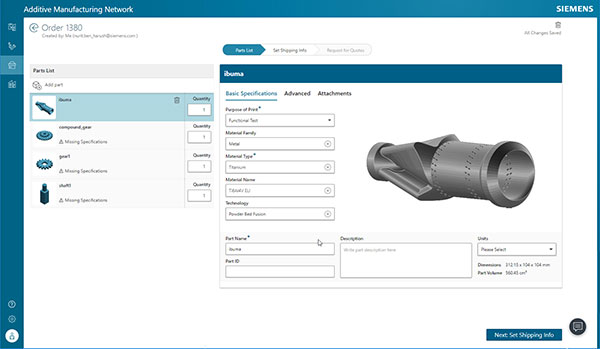
AM Tools from Siemens:
Can you provide a brief summary of how each works and what purpose each tool serves?
NX Design for Additive Manufacturing provides a comprehensive set of tools to analyze the geometry for any printability issues and repair as necessary. Synchronous modeling, convergent modeling, reverse engineering, and feature modeling tools in NX allow users to efficiently prepare the part for 3D printing. Generative designs with NX Topology Optimizer and Design Space Explorer allow product optimization through part consolidation and lightweighting, while ensuring that the product design meets all the design, engineering and manufacturing specifications.
NX Additive Manufacturing tools are used to optimally orient the part, generate the necessary supports and the parts optimally on the build tray to ensure a successful build. Automatic 2D / 3D nesting capabilities are used to optimize the placement of the parts based on the manufacturing requirements. NX provides the ability to generate the build files for a wide variety of 3D printer technologies. Managing the print profiles for each 3D printer in the shop is critical for preparing the print file for the 3D printer. The path viewer and the checkers allow the user to carefully inspect the output for any potential issues with the output.
Simcenter 3D’s build process simulation and deformation compensation are critical to achieve successful prints. The model is adjusted based on the process simulation results before the print file is generated. This greatly minimizes or eliminates costly reprints.
3D Printer technology specific processes need to be defined to create the routings in Opcenter. Once created, work orders and operations are automatically scheduled in the Advanced planning and scheduling application. The scheduling is performed against the physical assets, resources and calendar constraints in a rules-based system. The work order operations are executed on the shop floor once the print files are sent to the printers.
Additive Manufacturing Network allows you to manage the additive process workflow from print order to shipment. The integration with the data management, build preparation, production scheduling, execution and monitoring systems enable customers to have an efficient workflow on a digital thread with full traceability and deliver high quality. It also provides a digital inventory system for distributed manufacturing.
How might these tools be used (or improved upon) in the future?
Patel: Use of AI in automating design, simulation and build optimization is an area which will see faster innovation in the near future. More advanced build process simulation and closed loop additive manufacturing enabled by Insights Hub and advanced analytics is where we see strong growth in the future. SaaS transformation will enable a higher level of automation and faster innovation. Immersive engineering for process optimization towards volume manufacturing is another growth area.


From the very beginning, our mission has been to accelerate the world’s transition to local manufacturing and digital distribution. Our passion is to deliver a 3D printing system that drives business success across the world. That’s why…

Insider Q&A: 3D Printing End Use Parts
In this Insider Q&A, the experts at Ultimaker explain how 3D printing can be used for spare parts, jigs and fixtures in a production environment.

Stephanie is the Associate Editor of Digital Engineering.
Follow DE






About Us · Contact Us · Editorial Team · Advertising · Privacy Policy · Subscriber Services · © 2026 Digital Engineering 24/7 · Peerless Media