Helping design and engineering professionals discover, evaluate and specify technologies and processes that shorten the design cycle and enable success.


Alert!
Digital Engineering ceased publication on July 1, 2026. This website remains available as an archive of engineering content.
For inquiries or information, please email [email protected].
Take 3D printing to a new level with the latest release of Autodesk Netfabb. This 3D printing software is designed to help users accomplish more work in less time with fewer build errors, according to Autodesk.
The Netfabb 2021 release adds four new 3D printers to the built-in integration list:
View the full list of 3D printers supported here.
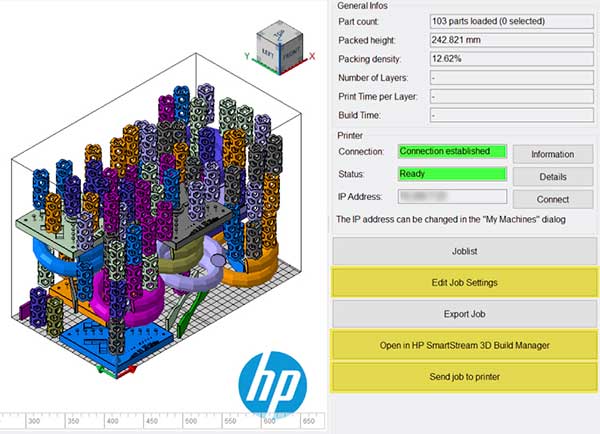
Expect improved integration with HP machines. Specifically, quickly establish print setting customizations with the ability to create, save and load print profiles for a given material right from Netfabb. In addition, transfer the full build platform to HP SmartStream 3D Build Manager with a single click.
Netfabb 2021 includes various new features and functions intended to make day-to-day tasks simpler:
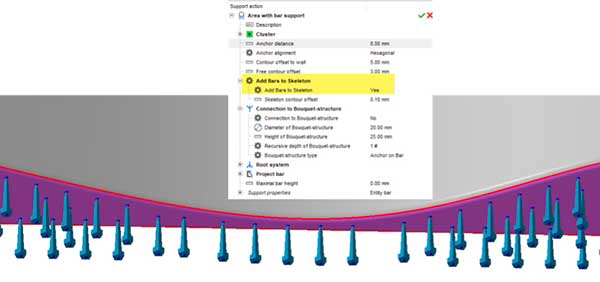
Now users can clone supports between similar parts, taper polyline supports to minimize the footprint as well as the effort required to remove them. Automatically create bar supports that recognize thin walls and generate a single path of bars, overriding the global contour offset to wall setting.
The Custom Part Library can be populated with your own geometries so there is quick access to parts used often such as custom test specimens used to fill up build platforms and common objects, such as giveaway parts.
Duplicate parts easily with the newly redesigned rectangular pattern dialogue. Automatically fill the build volume with selected parts and slices simultaneously. Automatically select all parts inside or outside the platform, making it easier to move these parts to a different platform or delete them entirely.
A new scripting example will allow you to compare two similar meshes automatically, and help identify differences with colors and graphs. Automatic support separation lets you separate open and solid supports into two parts with one click giving increased control over objects when assigning toolpath parameters. The ability to clone any workspace allows for faster duplication of a build platfrom to experiement with different packing, slicing or toolpathing strategies easily.
Capping off this new release are three features to help achieve better overall results:
1. New 3D packing methods. Two new algorithms increase packing density for processes that don’t require support structures, such as SLS and MJF. A size sorting algorithm prioritizes large parts for the center of the platform while filling the remaining volume with smaller objects, while the gravity algorithm uses a physics-based engine to simulate gravity and packs parts more closely.
2. Advanced toolpath features. New hexagonal hatch patterns help balance thermal input and build quality. Smoke simulation of slice data (from SLM Solutions and Renishaw) helps identify areas where the plume may interfere with the laser path, causing deflections that jeopardize build quality. The 2021 version also allows you to control toolpath vectors based on an external input, such as process simulation results.
3. Increased mesh limits. Simulation Utility LT (included with Netfabb Ultimate) simulates metal powder bed fusion technology to identify and remediate common build failures, including distortion, recoater blade interference, hotspots, lack of fusion zones, and support structure failure. With the 2021 version, we have relaxed the limits significantly to enable this utility to simulate even more complex geometries.
Visit the website for more details.
Sources: Press materials received from the company and additional information gleaned from the company’s website.


Autodesk is a world leader in 3D design, engineering, and entertainment software. They produce software for the architecture, engineering, construction, manufacturing, media, and entertainment industries.

DE's editors contribute news and new product announcements to Digital Engineering. Press releases may be sent to them via [email protected].
Follow DE
Join over 90,000 engineering professionals who get fresh engineering news as soon as it is published.






About Us · Contact Us · Editorial Team · Advertising · Privacy Policy · Subscriber Services · © 2026 Digital Engineering 24/7 · Peerless Media