Helping design and engineering professionals discover, evaluate and specify technologies and processes that shorten the design cycle and enable success.



May 2026 Special Focus: Artificial Intelligence in Design and Simulation
In this Special Focus Issue, learn about the latest developments in the integration of artificial intelligence into engineering workflows.

April 2026 Special Focus Issue: Generative Design
In this Special Focus Issue, Digital Engineering takes a look at how generative design solutions can be used across different types of design problems and with a variety of manufacturing approaches to accelerate design space exploration, and…
Autodesk's AutoCAD 2019 for Mac and AutoCAD LT 2019 for Mac are available now. The company offers a variety of new features and enhancements.
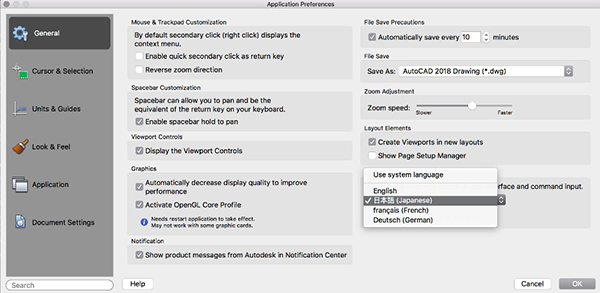
Gute Nachrichten! 良いニュース! German and Japanese languages are now supported in AutoCAD for Mac, in addition to the already available English and French languages. Simply select your preferred language in the Application Preferences dialog, and restart AutoCAD for Mac to see the language change.
The new DWG Compare feature in AutoCAD 2019 for Mac and AutoCAD LT 2019 for Mac helps easily identify graphical differences between two revisions of a drawing or Xref. Quickly view changes, see clashes and review constructability. Turning on revision clouds will further highlight the changes, and systematically cycle through each one to make sure every change is accounted for.

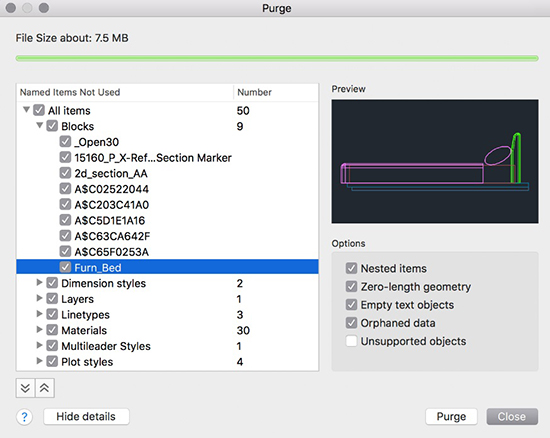
Autodesk added a user interface for the Purge command so it’s easy to Purge multiple types of objects at the same time. By default, all named items are selected for purge. Click Show Details to select and preview individual items to purge.
There are improvements to the user interface layout of the Plot dialog, moving the more frequently used options to the top for easy access. The new plot preview area makes plotting more efficient. With this new enhancement, preview exactly how your layout will appear post-plot and select desired settings to make changes in real time.
With the new views and viewports feature, create views while designing, then quickly insert any of the saved views in a layout. The NEWVIEW command creates a named view from what’s displayed in the current viewport, or from a rectangular window you define.
The new View Gallery allows you to insert a named view from the toolbar. This is a faster way to create a view in paper space and saves you from having to adjust the view by zooming in and out.
A new XREFLAYER system variable lets you specify a default layer on which new Xrefs are inserted, so you don’t have to change the Xref’s layer after every insert.
To make it easy to see which Xref layers have overrides, a new Xref Overrides layer filter is automatically created as soon as overrides are applied. When you rename or delete an Xref layer in the Xref drawing, it is automatically renamed/deleted when you reload it in the host drawings.
Sources: Press materials received from the company.


Autodesk is a world leader in 3D design, engineering, and entertainment software. They produce software for the architecture, engineering, construction, manufacturing, media, and entertainment industries.

DE's editors contribute news and new product announcements to Digital Engineering. Press releases may be sent to them via [email protected].
Follow DE
Join over 90,000 engineering professionals who get fresh engineering news as soon as it is published.






About Us · Contact Us · Editorial Team · Advertising · Privacy Policy · Subscriber Services · © 2026 Digital Engineering 24/7 · Peerless Media