Helping design and engineering professionals discover, evaluate and specify technologies and processes that shorten the design cycle and enable success.


Alert!
Digital Engineering ceased publication on July 1, 2026. This website remains available as an archive of engineering content.
For inquiries or information, please email [email protected].
Sponsored
 Dear DE Reader:
I can render an image to look pretty meh. Exacerbating my talentlessness is that many production rendering applications demand computer graphics expertise I ain't got. NVIDIA believes that rendering loads can be lighter whether you’re talking GPU (graphics processing unit) hardware or creating photorealistic images. Today's Check it Out link takes you to a dedicated webpage on NVIDIA's Iray advanced rendering technology. Here's why you should check it out.
The nickel tour is that Iray provides global illumination technology that generates photorealistic imagery by simulating the physical behavior of light and materials. Material properties leveraging NVIDIA’s Material Definition Language include surface color and refraction properties as well as the scattering and absorption properties of volumes. They can even include additional geometric properties of surfaces, such as cut-outs or displacements.In other words, Iray helps you simulate how light interacts with surfaces, volumes and so forth so that you can get results that reflect real-world behaviors and rival photographs.
Still, the key takeaway is that you don't have to be a computer graphics expert to create photorealistic imagery. Iray is engineered to be interactive and intuitive to use. It delivers immediate visual feedback throughout your editing session, so you see the effects of your design decisions quickly.
The trick is that Iray uses advanced algorithms that mimic realism, minimize noise and maximize performance during your interactive editing, and Iray's performance scales across your NVIDIA GPUs to maximize performance further. The Iray webpage at the other end of today's link has full details on Iray's features, scaling capabilities as well as a gallery of cool renders across a bunch of industries.
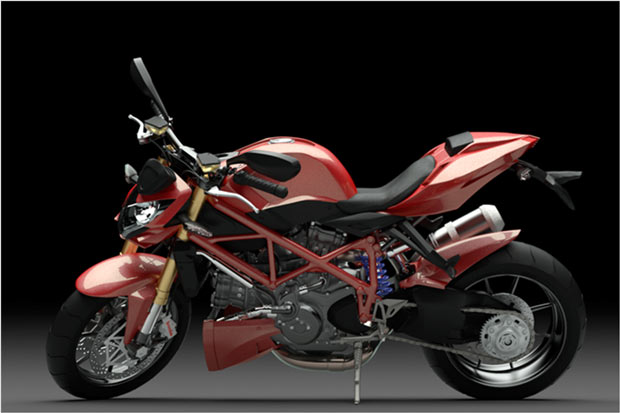 Iray delivers immediate visual feedback throughout the entire interactive design process. According to NVIDIA, Iray's advanced approximation algorithms mimic realism and minimize noise to help maximize performance. Image courtesy of NVIDIA Corp.
Now, some of you may work with Iray already. Iray plug-ins are available for tools like 3ds Max, CATIA Live Rendering Workbench, Maya, Rhinoceros and SOLIDWORKS Visualize. Or you can use it with applications for 3D content designers and visual effects artists from other technology partners like Patchwork 3D for digital aspect mock-ups or the Substance Designer material authoring software. There's even an Iray server solution for distributed Iray rendering across networked machines.
If Iray is news to you, now's the time to learn about it. The Iray webpage has a sign-up for downloading an Iray plug-in, enabling you to test drive Iray for 90 days. Yes, 90 days. Hit today's Check it Out link and give Iray technology a try. It could lighten your workload.
Thanks, Pal. – Lockwood
Anthony J. Lockwood
Editor at Large, DE


Anthony J. Lockwood is Digital Engineering's founding editor. He is now retired. Contact him via [email protected].
Follow DE






About Us · Contact Us · Editorial Team · Advertising · Privacy Policy · Subscriber Services · © 2026 Digital Engineering 24/7 · Peerless Media