Helping design and engineering professionals discover, evaluate and specify technologies and processes that shorten the design cycle and enable success.



May 2026 Special Focus: Artificial Intelligence in Design and Simulation
In this Special Focus Issue, learn about the latest developments in the integration of artificial intelligence into engineering workflows.

April 2026 Special Focus Issue: Generative Design
In this Special Focus Issue, Digital Engineering takes a look at how generative design solutions can be used across different types of design problems and with a variety of manufacturing approaches to accelerate design space exploration, and…
Virtual and augmented reality technologies are increasingly being incorporated into engineering and design workflows. In the past, many VR and AR applications focused on design review or marketing, but now these tools are being used throughout the design cycle, even in the very earliest stages.
Over the past year, there have been a number of advancements around AR, VR, and related mixed reality (MR) and extended reality (XR) solutions. While there has been a lot of activity around consumer-grade and gaming VR hardware, headsets and smart glasses are being deployed for professional applications that can offer the high resolution and responsiveness needed for engineering use cases.
However, although there is better hardware available, and more software providers are taking advantage of the technology, end user adoption is still relatively marginal.
“There are certainly applications for AR/VR/XR in these types of professional programs, but so far they’re still much more niche than anything close to mainstream,” says Josh Covington, managing director, Marketing & Sales, for workstation provider Velocity Micro. “That may be because AR/VR/XR is still shaking off the stigma of being a gaming platform only—or at best, leisure platform—although we could also argue that AR/VR/XR didn’t take off in the gaming space like it was supposed to either.”
Still, there are emerging applications where AR/VR/XR can enable new types of functionality, and the hardware and software are finally available to make that a reality.
“XR has a unique vantage point around real-world scale,” says Jason McGuigan, head of Global XR Commercialization at Lenovo. “If you are working on a large industrial machine, being able to see it at full scale gives you a different appreciation of the design. For small objects, you can view them at a very large scale that normally wouldn’t be available. When you are designing a car, being able to view the sight lines both inside the vehicle and looking over the hood of the vehicle play a big role in customer satisfaction. And that can be done in the early stage of the process before you create the first model off the production line.”
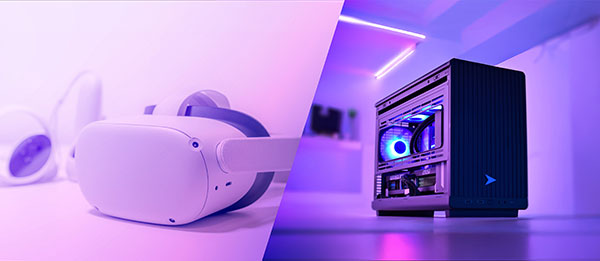
Engineering workstations require powerful GPUs to support VR workflows. Image courtesy of Velocity Micro.
Now, some of the most common use cases for AR/VR/XR are design review and training. The technology also enables better design review to help stakeholders better “see” what the product will look like prior to prototyping. Marketing teams can also use AR/VR models for advertising and interactive customer experiences.
In addition, AR/VR can also be used in manufacturing for training simulations. DE previously wrote about the pump manufacturer Permco, which uses VR technology to train shop floor employees on assembly processes using headsets and models based on SOLIDWORKS CAD files.
AR/VR can be used in product design and virtual prototyping to save time, money, and help prevent design flaws that would be costly to correct later in the process. Designers can use early designs to create virtual prototypes that can help test designs, simulate environmental interactions, uncover spacing or placement issues, confirm feasibility, and collect user feedback during the design process.
Early-stage virtual design validation, McGuigan says. “We have a partner we work with in the XR space that saved millions of dollars on a facility rebuild because when they were looking at models of the facility, there was a pillar that would have impeded the installation of some new machines. If they had gotten to the build stage and the pillar was there, it would have cost them millions in lost production and in moving the pillar. Artificial intelligence [AI] can also contribute in the digital twin creation space, and in improving the latent understanding of flows like heat and personnel, and helping designers simulate those environments early in the design stage.”
There is also significant opportunity around design collaboration, particularly for teams in disparate locations. Earlier this year, immersive design specialist Spatial announced Analogue 2, a 3D collaborative design platform built natively for Apple Vision Pro. The Designer UI in the solution allows the use of natural hand gestures to move, scale, and rotate digital 3D assets; and use precision controls to place the asset in the exact spot, the company says.
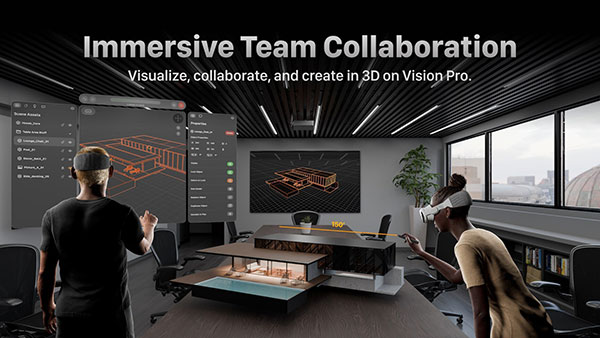
Spatial’s Analogue 2 is a 3D collaborative design platform for Apple Vision Pro that allows the use of natural hand gestures to move, scale, and rotate digital 3D assets. Image courtesy of Spatial.
Analogue 2 supports the OpenUSD standard, championed by NVIDIA as the format for its Omniverse platform. The OpenUSD Alliance’s founding members include Pixar, Apple, NVIDIA, Adobe, and Autodesk.
“The use case that is most ubiquitous in engineering is collaboration,” says Ben Widdowson, head of Marketing, Immersive Engineering, at Siemens Digital Industries Software. “Being able to have multiple people looking at the same digital twin at the same time, or collaboratively designing parts and assemblies. That’s what everybody wants to do.”
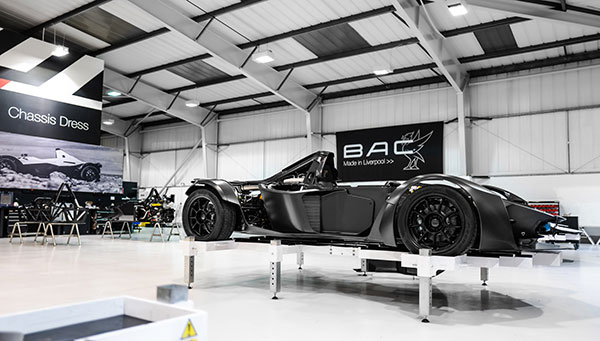
For example, Briggs Automotive Company (BAC) is designing its Mono supercar using the Siemens Xcelerator portfolio. As part of that project, BAC is using immersive engineering, which lets customers see the vehicle they are selecting and building in a virtual environment. BAC is also leveraging virtual reality for designers to experience a digital twin of their designs, and for collaboration among the design team members.
Moving from CAD to AR/VR/XR can unlock a number of interesting applications, and NVIDIA has been facilitating this process through its GPUs and the creation of its Omniverse virtual environment. A number of CAD software vendors now support USD (the format Omniverse is built upon), including Autodesk, Ansys, Siemens and Hexagon.
There is typically a conversion that has to happen between CAD and VR, and in some cases that may mean a reduction in fidelity. It also means that the CAD and the virtual rendering are not necessarily in sync.
Siemens Digital Industries Software has been working with NVIDIA to create a way for designers to evaluate their models in VR, while also offering some direct editing functionality. Siemens offers NX Immersive Designer, which leverages Sony HMD headsets, allowing engineers to make changes in VR that are reflected in the NX model.
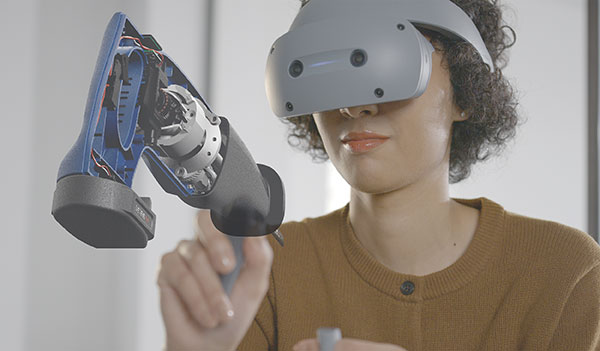
“We had immersive capabilities through VR for many years, but the big barrier in the industry was that you had to export the data out of the CAD system and bring it into a game engine,” says Widdowson. That took time and effort, and exposed CAD data in an insecure environment.
“In the NX Immersive Designer environment, you don’t have to do any data prep,” Widdowson says. “Any changes you make just work.”
Engineering use cases typically need much larger frame buffers, and rely on powerful GPUs to accelerate rendering and accommodate human movement. Usually, because of the compute requirements for the graphics, engineers want AR/VR/XR headsets that are connected to a workstation, rather than having the compute power directly in the headset.
For engineers that want to incorporate the technology into their workflows, graphics are going to be an important consideration when it comes to their workstation hardware.
“Many AEC professionals are used to focusing exclusively on CPU frequency with their workstations, or at best adding an entry-level pro graphics card, but that would be an enormous mistake if they need AR/VR/XR capability as well,” Covington says. “Headsets need additional graphics power that most CAD applications don’t utilize and with few exceptions, the more graphics power, the better the overall experience. [NVIDIA] GeForce cards are still the best value for this type of application, though Quadro/Pro cards have advantages with scalability that 50-series cards do not.”
McGuigan says users need to consider the entire environment—not just the workstation and headset, but the software, network, and everything associated with it. “If you look at a design-centric workstation, you already likely have a robust GPU, but that does not mean it will be enough. If you have a wired connection, you are usually taking the full frame from the GPU and splitting it into two separate images running simultaneously on the screens inside the VR headset. That can double or triple the load on the GPU and put a major drag on it.”
Wireless connections present different constraints. “You still need a high-end GPU, but you are not pushing it out at a higher frame resolution,” McGuigan adds. “You are going through a secondary post-process in the wireless device. You render on the PC, and the PC encodes the frame to the router, and when it gets to the wireless headset it gets decoded on a frame-by-frame basis.”
He says the best scenario is having the PC hardwired to the wireless router, with a wireless connection to the headset. “If you use Wi-Fi from the PC to the router and then to the headset, you get too much lag,” McGuigan says.
He also adds that wired headsets often require a native port on the workstation and, in some cases, secondary power.
Jeffrey Miller, Customer Success Marketing, Siemens, notes that Siemens’ VR capabilities rely on desktop level visualization. Siemens Teamcenter serves as a data backbone, housing the actual assemblies on a server. Siemens recommends using certified professional-grade NVIDIA GPUs for its applications.
“Some customers don’t follow that guidance and use gaming cards, which can work, but we always recommend the certified NVIDIA cards,” Widdowson says. “Which type of GPU will depend on what the user requirements are, and the sizes of the models they are working with.”
There is also a wide range of VR headsets available for these applications. “With headsets, the basic technology is the same, but the current gen hardware is still pretty unrecognizable compared to a decade ago,” Covington says. “Better comfort, better frame rates, and higher resolution are all the obvious points. But the evolution from pure VR to the seamless blending of AR with VR that Apple Vision Pro and similar headsets can offer is probably the biggest game changer. I don’t think anyone would call the Vision Pro a success, but I think that’s more price-related than consumers just rejecting the product as a whole concept.”
The general trend in headsets is for them to be lighter and smaller. “We also see a big push for offloading as much computing as possible,” McGuigan says. “AI is helping in this space. What we’re seeing is the load being done externally, and AI only pulling in things as necessary. There are also advanced concepts like Google’s Genie 3, where you can create world models without polygons, so the processing needs are all dramatically reduced. You will need GPUs to create the world model, but you can get photorealistic visuals pushed to a headset on a frame-by-frame basis as needed.”
Widdowson notes that there has been a move among some customers from immersive VR headsets to mixed reality so users can see a digital twin of a product in the working environment. Siemens works with a number of headset manufacturers for its NX Immersive Explorer product for design review, but has partnered with Sony specifically for the NX Immersive Designer product.
Not all solutions require headgear. Distance Technologies last year demonstrated “glass-free AR,” a prototype that used a piece of glass installed at angle to create hologram-like visuals, for example.
While demand for VR capabilities in engineering is still in the early stages, hardware advancements are rapidly enabling advanced functionality.
“The compute power from NVIDIA gets better year after year,” Widdowson says. “But what we see, though, is that the requirements for what people want to do just grow right along with the ability to process the data. People can load bigger models and assemblies in VR. As master compute power grows, demands grow at the same pace.”


Velocity Micro is the premier high-performance innovator of consumer technology and electronics in North America.

Accelerate workflows and increase efficiency with Velocity Micro’s professional class workstations
If your projects are being bottlenecked by inefficient and ineffectual PC hardware, Velocity Micro’s professional class workstations can directly accelerate your workflows to make your team more efficient. Download this doc to learn more.

Brian Albright is the editorial director of Digital Engineering.
Contact him at [email protected].

Join over 90,000 engineering professionals who get fresh engineering news as soon as it is published.






About Us · Contact Us · Editorial Team · Advertising · Privacy Policy · Subscriber Services · © 2026 Digital Engineering 24/7 · Peerless Media