Helping design and engineering professionals discover, evaluate and specify technologies and processes that shorten the design cycle and enable success.


Alert!
Digital Engineering ceased publication on July 1, 2026. This website remains available as an archive of engineering content.
For inquiries or information, please email [email protected].

May 2026 Special Focus: Artificial Intelligence in Design and Simulation
In this Special Focus Issue, learn about the latest developments in the integration of artificial intelligence into engineering workflows.

April 2026 Special Focus Issue: Generative Design
In this Special Focus Issue, Digital Engineering takes a look at how generative design solutions can be used across different types of design problems and with a variety of manufacturing approaches to accelerate design space exploration, and…
ZWCAD 2019 SP2 from ZWSOFT is here. Compared with ZWCAD 2019 SP1, the efficiency of SP2 has been further enhanced. Read on to discover what's new.
The elements in PDF such as geometric objects, hatch objects, raster images and TrueType text can now be imported to the current drawing as CAD entities by PDFIMPORT. Except for importing the PDF files directly, you can also transform the existing PDF Underlays into editable CAD entities.
Through turning the elements in PDF into CAD entities, edit what you want from PDF files with ease.
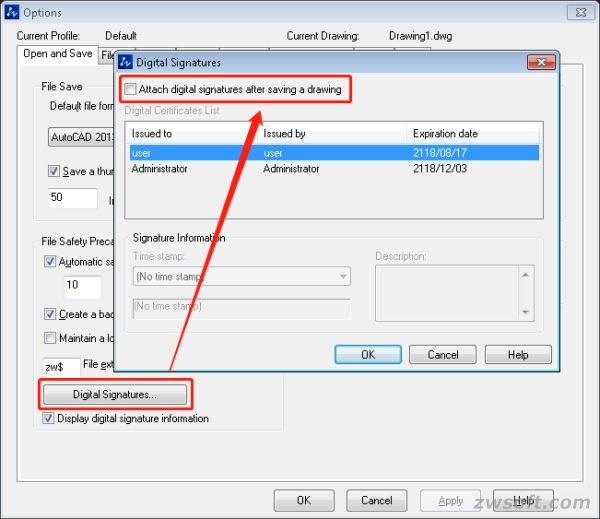
Digital Signature can now be attached to DWG2004, DWG2010, DWG2013 and DWG2018. You can attach digital signature to the current drawing by DIGITALSIGN command, and also to a batch of drawings by selecting Attach Digital Signature in the Start menu.
In addition, through command SIGVALIDATE, digital signature can be verified to check whether it is contained in the current drawing.
Previously, there were only three options in the right-click menu of 3DORBIT—Exit, Pan and Zoom. Now, more options have been added, such as Virtual Aids, Shade Mode, Zoom Windows/Extents/Previous, Reset/Preset/Named View, etc. Moreover, functions like Constrain Orbit, Continuous Orbit and Adjust Distance are also available, making 3DORBIT easier and handier to use.
Sources: Press materials received from the company and additional information gleaned from the company’s website.

ZWSOFT (ZWCAD Software Co., Ltd.) is a world renowned CAD/CAM solutions provider. With a reputation as a committed and reliable provider of CAD/CAM software to the AEC and MCAD industries, ZWSOFT has created design software products that have…

DE's editors contribute news and new product announcements to Digital Engineering. Press releases may be sent to them via [email protected].
Follow DE






About Us · Contact Us · Editorial Team · Advertising · Privacy Policy · Subscriber Services · © 2026 Digital Engineering 24/7 · Peerless Media