Helping design and engineering professionals discover, evaluate and specify technologies and processes that shorten the design cycle and enable success.


Alert!
Digital Engineering ceased publication on July 1, 2026. This website remains available as an archive of engineering content.
For inquiries or information, please email [email protected].

May 2026 Special Focus: Artificial Intelligence in Design and Simulation
In this Special Focus Issue, learn about the latest developments in the integration of artificial intelligence into engineering workflows.

Design & Simulation Software Guide 2025
In this Special Issue, Digital Engineering presents its second annual guide to design and simulation software vendors.
Part human, part horse, the mythical Centaur was born in the romantic imagination of the Classical Period. You'll find him fending off Theseus in Ovid's Metamorphosis, roaming the foothills of Pelion in Pindar's verses, and battling legendary heroes in Homer's Iliad.
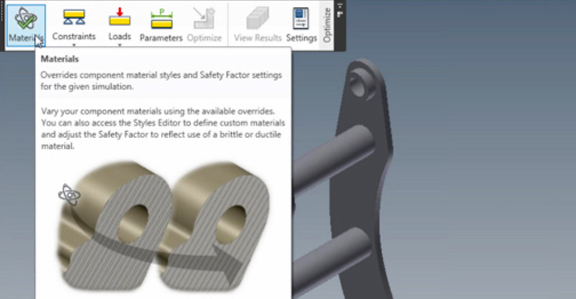
If you are an Autodesk beta tester, you may also find him in Autodesk Inventor 2011, nestling under the Optimize tab.
Project Centaur is the name of an Autodesk technology currently in limited beta (by invitation only). It's a plug-in for Inventor users to perform design optimization in the cloud. This feature allows you to pick a design, specify materials, specify constraints (for example, holes A and B are connected to the rest of the assembly via pin joints), specify load conditions, specify variable parameters, then run an optimization session.
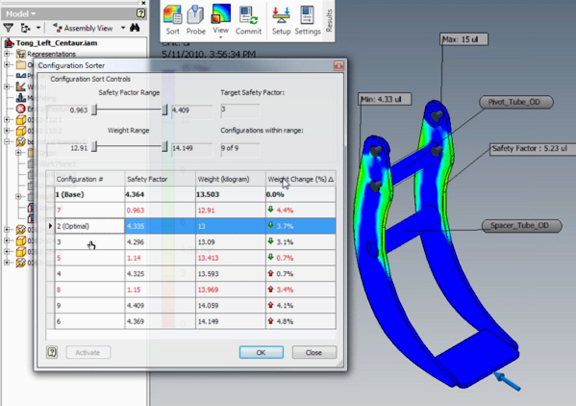
In return, you receive a number of proposed design iterations, with slight variations in safety factors, weight gains or weight losses, and percentages of weight changes. Usually, the most optimal design (identified by the software based on your specs) is presented at the top of the list, but you can view all iterations and pick the one you feel is the best.
An optimal design is usually one that meets your target safety factor, but with less material than you started off with. So you can conceivably use this approach to identify places where you can shave off materials without compromising strength, durability, or integrity. In the way it works, it closely resembles SolidWorks' design optimization feature (as demonstrated in this video clip), with one big difference -- in Autodesk's Project Centaur, number-crunching takes place in the cloud.
I'm sure you're familiar with the usual protocols involved in performing computation-intensive operations (usually, it's simulation, analysis, or rendering). You set up the scenario (perhaps an analysis of a 1,200-part assembly, vivisected into millions of fine meshes, or a 28,000-polygon model under complex lighting conditions), hit "Run" or "Render," then go take a shower or walk your dog around the block while your CPU sweats. With Centaur, you can continue to work on your model while the optimization is in progress. In fact, your local machine's CPU is free, still at your disposal, so you may even run a stress test on a small part while you wait for optimization results.
Centaur implementation shows Autodesk is learning -- quickly -- from its previous cloud experiments. With initial release of Project Twitch, the technology was available only to those living within 1,000 miles from Autodesk's data center in California (where the application was physically running), effectively preventing many eager users from trying it out. This has since been corrected.
With Centaur, the application runs in Amazon-hosted cloud services, so where you live shouldn't limit your access to the software or its performance. At the moment, the hosted application needs to support only a finite number of beta testers, so, if you're one of the beta testers, you should be able to get your optimization results within a reasonable time. It's difficult to predict how scalable the application is or whether it'll perform just as well when the public beta version is rolled out to the masses.
Like its namesake, Autodesk's Centaur is part-desktop, part-cloud, a hybrid creature straddling two environments. This allows the technology to take advantage of the cloud for purposes where the local CPU may not be powerful enough. (There's no reason you can't perform a design optimization using your local CPU, but doing it remotely using the more powerful CPUs in the cloud is just infinitely faster.)
I'm on the list of beta testers, so I'm planning to run a few tests and file a video report. Stay tuned!


Kenneth Wong is Digital Engineering's resident blogger and senior editor. Email him at [email protected] or share your thoughts or suggestions at digitaleng.news/facebook.
Follow DE






About Us · Contact Us · Editorial Team · Advertising · Privacy Policy · Subscriber Services · © 2026 Digital Engineering 24/7 · Peerless Media