Helping design and engineering professionals discover, evaluate and specify technologies and processes that shorten the design cycle and enable success.


Alert!
Digital Engineering ceased publication on July 1, 2026. This website remains available as an archive of engineering content.
For inquiries or information, please email [email protected].

May 2026 Special Focus: Artificial Intelligence in Design and Simulation
In this Special Focus Issue, learn about the latest developments in the integration of artificial intelligence into engineering workflows.

April 2026 Special Focus Issue: Generative Design
In this Special Focus Issue, Digital Engineering takes a look at how generative design solutions can be used across different types of design problems and with a variety of manufacturing approaches to accelerate design space exploration, and…
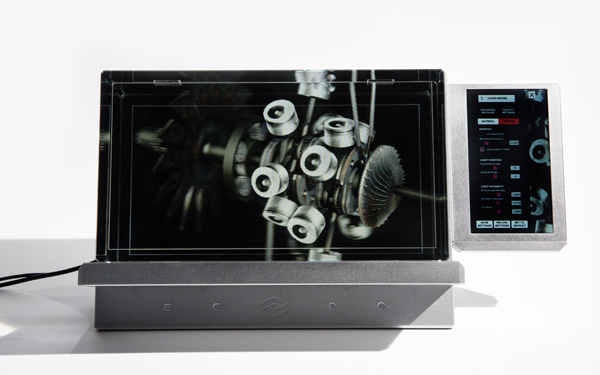
As a static display unit, The Looking Glass Factory's holographic display box offers the Wow factor, but not much else. However, interactivity and built-in compute power bring the latest incarnation of the company's technology to a whole new level.
The company has been developing and selling the displays for about three years now. The entry product, the Looking Glass Standard, is 8.9" at 4 million pixels in resolution. The next step up, the Looking Glass Large, is 15.6" at 8 million pixels, weighs 18.6 lbs. They both require their own power source, but also a connection to a PC or workstation that meets system specs (Intel Core i5 or above, with NVIDIA GeForce GTX 1060 or above). The units don't have processing power in themselves; they have to borrow CPU and GPU capacity from an external source.
The latest addition to the company's portfolio is The Looking Glass Pro, with a touch screen panel on the side (for file loading and navigation). The Pro, on the other hand, doesn't need a connection to a PC or Workstation. It had its own built-in Intel NUC 8 VR NUC8i7HVK computer. With a 15.6" display area, it weights 25lbs.
Note: The Looking Glass displays are part of this video report. See how they work below.
The display units support content authored in Unity, Unreal, Three.js, and more. You load the model into the Looking Glass environment as OBJ, FBX, and other neutral 3D formats exportable from CAD programs. The company has assembled about three dozens holographic content and games, freely accessible to users.
Looking Glass's front-facing surface is touch-responsive, so you can use pinching, poking, stretching, and other standard methods to zoom in, pan, and rotate the loaded 3D models and scenes. But upgrading the display with an Interaction Accessory Pack (a Leap Motion sensor) brings more interactivity.
Leap Motion, a motion-detection sensor the size of a Starbucks coffee mint box, can translate hand positions and gestures and apply them to the holographic objects. If the loaded model contains proper physics and kinematics, you can, for example, poke, punch, or pull on it to get realistic responses.
Last week, Leap Motion announced it's merging with Ultrahaptics, a development partner that specializes in simulation mid-air touch sensation. "This deal will create a vertically integrated technology company that brings us that much closer to fully immersive, rich and physically intuitive virtual interfaces," Leap Motion writes in its blog post. The merger is not expected to disrupt Leap Motion's existing relationship with hardware makers such as The Looking Glass Factory.
In demonstrating the Looking Glass displays, the company often uses the 3D human heart model created using Dassault Systemes' 3D EXPERIENCE technology, suggesting the CAD-to-hologram conversion process is not difficult.
If properly adapted, the Looking Glass holographic display could offer new ways to apply stresses and loads in 3D models in simulation software. Currently, in the 2D-driven mouse-and-keyboard paradigm, you need to rotate the model, select the surface, and apply the forces as numeric values. But what if you can simply press down or pull on specif surfaces and structures to see deformation as instant feedback? It's a vision The Looking Glass cofounder Alex Hornstein wants to explore.
“Right now, you can do simple tasks, like displaying scenes built in Simulia in Looking Glass for marketing purposes,” he says. “But the best approach is a native-level integration with Simulia. With that kind of approach, the holograms in Looking Glass can retain the same model joints and constraints in Simulia. It's something we're interesting in pursuing in collaboration with Dassault Systemes Simulia,” says Hornstein.
If you bring CAD assemblies into AR-VR (augmented and virtual reality) environments or into The Looking Glass display as neutral 3D file formats, you usually lose the assembly mating conditions (such as rotating pins, bonded surfaces, and bolted parts). Only a native-level integration would allow you to retain such intelligence. If an assembly model can retain such detailed kinematics in the AR-VR environment or holographic displays, it can be the foundation for visualizing digital twins.
Holographic technologies are part of the emerging AR-VR space. In AR, they are often integrated into the firmware for headset so you can view digital objects as floating holograms. But The Looking Glass offers you way to view it inside a desktop display. It's a computing paradigm not yet fully explored, especially its implications for design and simulation.
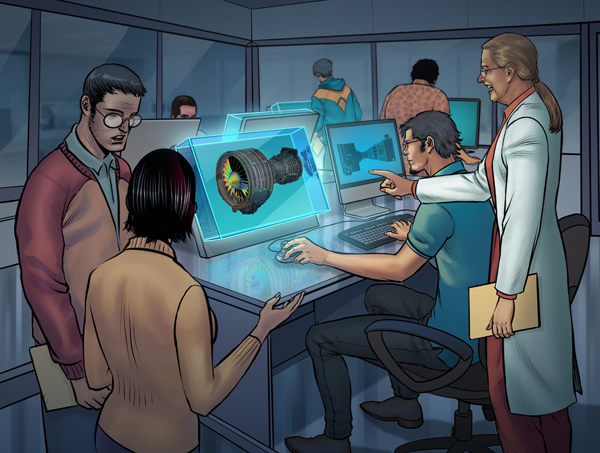
The Looking Glass unit's holographic efffect is confined to a specific viewing zone, roughly directly in front of the display. It may have limited use as a collaborative display for a group of people. People standing at an angle to the display unit or looking over the shoulder of the primary user, for example, may not get the full effect of the holograms. This limitation exists in autostereoscopic display panels as well.
The company's efforts to bring interactivity and build partnerships with simulation software leaders suggest it's taking the lead to create the market that it's ideally designed to serve.
The Looking Glass Standard: $698
The Looking Glass Large: $4,000
The Looking Glass Pro: $5,500 introductory; $6,000 regular
Optional Interaction Accessory Pack (Leap Motion sensor): $99


Dassault Systèmes, the 3DEXPERIENCE Company, is a catalyst for human progress. We provide business and people with collaborative virtual environments to imagine sustainable innovations. The 3DEXPERIENCE platform enables companies to create and…

Electrum utilizes the 3DEXPERIENCE platform on the cloud to develop their new electric motorcycle
Electrum, a new brand of electric motorcycles, utilizes the 3DEXPERIENCE platform. Their mission is to support Indonesia’s shift to low-carbon, sustainable transport and to ultimately help the country’s government achieve its vision of net zero carbon emissions by 2060.

Kenneth Wong is Digital Engineering's resident blogger and senior editor. Email him at [email protected] or share your thoughts or suggestions at digitaleng.news/facebook.
Follow DE






About Us · Contact Us · Editorial Team · Advertising · Privacy Policy · Subscriber Services · © 2026 Digital Engineering 24/7 · Peerless Media