Helping design and engineering professionals discover, evaluate and specify technologies and processes that shorten the design cycle and enable success.


Alert!
Digital Engineering ceased publication on July 1, 2026. This website remains available as an archive of engineering content.
For inquiries or information, please email [email protected].

May 2026 Special Focus: Artificial Intelligence in Design and Simulation
In this Special Focus Issue, learn about the latest developments in the integration of artificial intelligence into engineering workflows.

April 2026 Special Focus Issue: Generative Design
In this Special Focus Issue, Digital Engineering takes a look at how generative design solutions can be used across different types of design problems and with a variety of manufacturing approaches to accelerate design space exploration, and…
Currently, many of the AI-powered assistants and agents in your design software are no more than search engines and databases augmented with natural language. This in itself represents a huge leap in making CAD more accessible.
Instead of memorizing the precise menu or sequence of commands required to execute a Revolve Cut or an Extrusion along a Path, you can ask for parametric modeling help in everyday language, and get your answer in the same way. But in the next phase of AI-powered design, your assistants will get more personalized. Trained on your own data, you can expect them to understand and mimic your unique style, design preferences, and modeling methods. In this article, we speak to a number of leading mainstream CAD developers to bring you a sneak peek into this future.
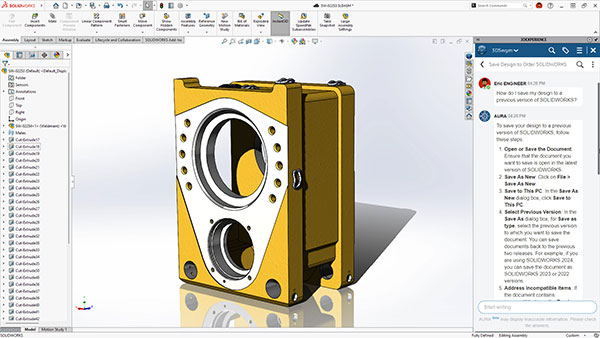
Last year, Manish Kumar, CEO of SOLIDWORKS, was visiting his daughter at her school during a robotics competition. One robotic team happened to be using SOLIDWORKS CAD. When students discovered he was the main man behind the software, they turned to him for tech support. To solve a file compatibility issue, the team asked Kumar: How do you save an assembly file so it can be opened with a previous version of the software?
“Despite being a technical guy, I struggled,” Kumar admits.
When the AI-powered assistant Aura was added to SOLIDWORKS, Kumar decided this should be the first test. “I asked Aura the same question. The answer I got was not a passage from the software’s help document. It was a step-by-step instruction specific to my question, based on what was available in the forums, in our internal database, and also the help document.”
Manish believes Aura represents how most new users will likely learn and use the software in the future. Instead of fumbling through myriad menus and commands, they’ll use natural language—in text or voice—to find out how to model the desired geometry.
The company is still working on the automatic assembly function, previewed at 3DEXPERIENCE World 2025. But the command predictor and image-to-sketch conversion is now part of SOLIDWORKS.
Kumar envisions that in the future Aura will behave much more like a veteran or expert user available for consultation.
“Imagine that you made a change, and it caused a bunch of failures. Generally, you just get error messages from the software,” he says. “Because Aura is powered by a LLM [large language model] and grounds its answers to the context of our software, it could provide you with an analysis on what went wrong. It might tell you, for example, that the root cause was an invalid sketch [identified with a number], combined with the cut-revolve operation [identified with highlights on the geometry], causing cascading errors.”
Aura could be that specific because, as Kumar points out, “It has access to our historical knowledge, which suggests, if you have certain types of errors, [it can determine] what the root causes might be.”
Furthermore, in Kumar’s research and development vision, Aura would be able to identify and select assembly components by characteristics—such as all brackets made of titanium—to allow you to execute a single command on all. In automatic drawing creations, you could also instruct Aura to use a specific drawing standard, whether it’s a company standard or an ISO standard.
The integration of natural language input isn’t a death knell for the classic menu-driven user interfaces (UI). For the foreseeable future, the CAD UIs will likely need to accommodate both input types.
“In simulation, you might select the surfaces you need with mouse clicks, then talk to the software about the loads and boundary conditions you want applied,” Kumar points out.
Kumar believes natural language prompts will become a common way to construct basic geometry.
“You’d still need commands and menus to parametrically refine the geometry,” he says. “But you might access these commands though voice and text prompts”—the way he would have done it, if Aura had been available when he was helping a robotics team troubleshoot under pressure at his daughter’s school.
AI-driven features are now a part of Siemens’ Designcenter NX and Designcenter Solid Edge. For example, capabilities include predictive design intent, command prediction, selection assistance, magnetic snap assembly, AI-based automatic drawing generation, AI-assisted machining suggestions, generative design, and the Design Copilot.
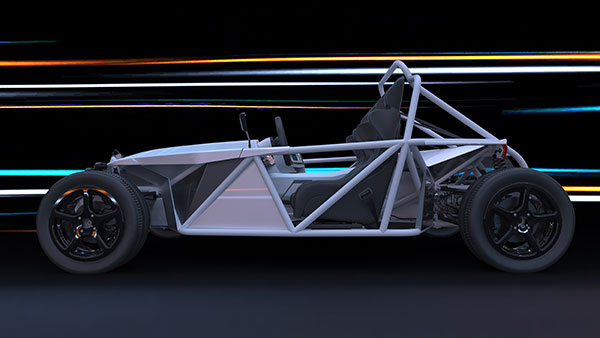
AI-powered features such as command prediction, selection assistance, and magnetic snap assembly, are part of Designcenter NX. Image courtesy of Siemens.
“The Copilot adds in-context assistance directly inside the tools, while automation handles repetitive work like constraint creation, documentation setup and manufacturing preparation,” says Dale Tutt, vice president Industry Strategy, Siemens Digital Industries Software.
Tutt also expects that, with AI-powered reduced order models (ROMs) trained on simulation and test data, users can generate rapid, data-driven predictions before full validation, streamlining design iterations.
“Simcenter HEEDS’ AI Simulation Predictor employs accuracy-aware, adaptive learning to optimize designs more efficiently, reducing development time without increasing costs,” he adds.
Over time, Tutt thinks AI will become just a natural part of the design and simulation workflow, no longer a novelty. But its impact can be enormous.
“As AI models improve, they’ll be able to handle larger and more complex designs with greater confidence, giving engineers useful feedback earlier and more often. That means less waiting, fewer setup steps, and more room to explore ideas before committing to a final direction … It helps engineers make better decisions as they work, rather than after the fact, which ultimately changes how design and analysis come together in a more fluid, connected way,” he says.
Onshape, part of PTC, has always touted that its software’s cloud-native architecture sets it apart from other CAD programs, rooted in the legacy desktop code and is now transitioning to the cloud or straddling both. Onshape offers free versions as well as subscription-based commercial versions. Whereas the paid version of Onshape offers private storage, the free version only offers public storage, making the design data open source. These 3D models and drawings, estimated to be over 15 million, along with Onshape’s own internal data are a goldmine for machine learning, points out Darren Henry, senior vice president, Onshape General Operations.
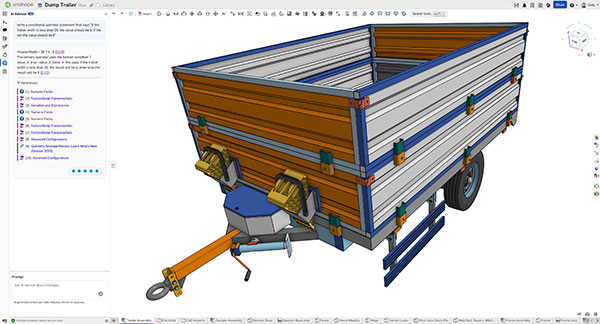
Onshape AI advisor helps author a conditional statement in a trailer design. Image courtesy of Onshape.
Onshape executives emphasize that the training dataset does not include private data, stored in their own private space by commercial users. Education users’ data is not considered open source, clarifies Henry.
In April 2025, Onshape introduced the AI Advisor, described as “an AI-powered assistant designed to provide expert knowledge and best practices.” It’s available to the free, commercial, and education users. For instance, if you ask the Advisor to help you model something, “It gives you a series of steps or tools that you will need—or example, the revolve feature necessary to construct a piston,” says Cody Armstrong, senior director, Onshape AI Innovation.
“Ask Onshape Advisor a question like, ‘How do I pattern a sketch?’ It’s a question that other assistants often get wrong, because it’s different from feature patterns or assembly patterns,” adds Armstrong. “With Onshape, what you get is a very nuanced, yet meticulous answer, even down to the point about left-clicking on the empty space to accept the proposed pattern.”
At a more complex level, the Advisor can help you write conditional statements. “It’s syntax that allows you to define a conditional operator in an Onshape feature. For example, if the width exceeds a certain point, increase the number of feature pattern instances. The Advisor gives you the exact syntax you can copy and paste into a dialog to drive this function,” Armstrong explains.
In the coming months, Onshape is planning to improve multilanguage support in its AI Advisor, allowing users to use their own native languages to issue prompts.
“The benefit is huge. It makes the Advisor more accessible, even in some languages we don’t yet support as a product,” Armstrong says.
Onshape uses a feature script, akin to a programming language for Onshape.
“It’s very similar to JavaScript, but purpose-built for geometry modeling,” explains Armstrong. In the future, the software will include an autocomplete function to make scripting faster and easier, Armstrong notes. “Not all engineers know how to code. This is going to allow Onshape users to write their own custom features. Let’s say you work for a firm that builds hydraulic blocks. Now you can write a feature that creates hydraulic ports.”
Beyond the usual search function by part numbers or other metadata, which relies on a text match, Onshape AI will in the future improve search results by adding a visual descriptor, Armstrong says. To enable speedy rendering that can bypass classic ray tracing, the company also plans to add AI-powered rendering, allowing you to put a model in a scene with text prompts, such as “a red plastic detergent bottle with a blue lid, sitting on a marble countertop in a kitchen.”
Perhaps the most radical step of all, Onshape says it plans to add AI Agents that can, if you allow, make modifications to your geometry, in addition to offering advice and automating tedious tasks.
“They’ll be able to act autonomously, depending on the permission you choose to give them. You can set permission at the individual document level. It will understand things like company standards,” says Armstrong. “You can think of them as autonomous colleagues who act on your behalf, and every action they take can be tracked in an audit trail.”
This step is made possible by the cloud-native architecture that permeates through Onshape’s data management system, according to Armstrong. Part of Onshape’s long-term AI strategy is the introduction of the Onshape MCP (Model Context Protocol) server, which will allow the users’ custom-built agents to interact with Onshape’s agents.
During Autodesk University 2025, Autodesk revealed its roadmap for AI. The core of its strategy was Neural AI, described by the company as “a new class of generative AI technologies built using machine learning and artificial neural networks.” The first tangible piece to appear in products would be Neural CAD, “a category of generative AI foundation models trained to directly reason about CAD objects.” Neural CAD would be incorporated into Autodesk Fusion (for product design and manufacturing) and Autodesk Forma (for architecture, engineering, and construction). The new approach allows you to produce editable CAD geometry from text prompts, sketches, or images.
“Objects and shapes generated by neural CAD for geometry in Fusion are boundary representation (BREP) geometry, not static meshes,” says Jon den Hartog, vice president of Design, Autodesk. “This means they are parametrically editable within Fusion’s existing CAD environment. This technology can also generate the sequence of parametric commands that would traditionally be used to create an object, ensuring compatibility with established workflows. Users can refine models using standard CAD tools (adjusting dimensions, constraints and features) like they would with manually created geometry.”
This approach is not going to be exclusive to Autodesk, Hartog recognizes. “We intentionally did not brand or trademark the term, as we expect that other technology companies will attempt to develop similar machine learning approaches to design and make. We expect our customers to build upon third-party LLMs and Autodesk’s machine learning models, customizing these with their own data and work processes,” he adds.
CAD skills in the past revolved around mastering the commands and menus of the software program, knowing the exact sequence of operations required to create a certain type of surface, extrusion, or trim. For the new breed of CAD, Hartog says, “Engineers will need a unique blend of technical and creative skills. Digital fluency will be essential, enabling comfort with AI-powered design tools, generative workflows, and cloud-based collaboration. Equally important is AI literacy, which involves understanding how to guide AI outputs through effective prompts, interpret results, and validate designs.”
He encourages engineers to embrace systems thinking, to recognize connections across disciplines. For example, sustainability and data-driven design, requiring expertise in lifecycle assessment and optimization for environmental impact. To succeed in the new era, he said engineers should “act as what our CEO Andrew Anagnost calls ‘creative orchestrators’ rather than mere code writers, ensuring that AI outputs align with design intent and industry standards.”


Simcenter™ software, from Siemens Digital Industries Software, uniquely combines system simulation, 3D CAE and test to help you predict performance across all critical attributes earlier and throughout the entire product lifecycle. By combining…
Making the Case for Artificial Intelligence and Machine Learning in Engineering
In this paper, Siemens Digital Industries Software and Digital Engineering will provide an overview of how AI/ML-enabled software can improve design workflows, while also addressing common questions and concerns around implementing this technology in an engineering organization.

Kenneth Wong is Digital Engineering's resident blogger and senior editor. Email him at [email protected] or share your thoughts or suggestions at digitaleng.news/facebook.
Follow DE






About Us · Contact Us · Editorial Team · Advertising · Privacy Policy · Subscriber Services · © 2026 Digital Engineering 24/7 · Peerless Media